Spring Cloud Microservices Beginner Tutorial (1): Microservices Introduction Spring Cloud Microservices Beginner Tutorial (2): Service Registration and Discovery — Eureka Spring Cloud Microservices Beginner Tutorial (3): Service Registration Spring Cloud Microservices Beginner Tutorial (4): Inter-service Invocation — FeignClient Spring Cloud Microservices Beginner Tutorial (5): Centralized Config — ConfigService Spring Cloud Microservices Beginner Tutorial (6): Spring Cloud BUS Message Bus for Dynamic Config Refresh Spring Cloud Microservices Beginner Tutorial (7): Spring Cloud Stream Message-driven Microservices Spring Cloud Microservices Beginner Tutorial (8): Spring Cloud Zuul API Gateway Dynamic Routing, Cookie Passing, and CORS Spring Cloud Microservices Beginner Tutorial (9): Zuul Gateway Integrating Swagger2 for Auto-generated RESTful API Docs Spring Cloud Microservices Beginner Tutorial (10): Spring Cloud Hystrix Circuit Breaking and Service Degradation Spring Cloud Microservices Beginner Tutorial (11): Spring Cloud Sleuth + Zipkin Service Tracing and Link Monitoring Spring Cloud Microservices Beginner Tutorial (12): Spring Cloud Docker Containerized Deployment
Code will be shared at https://github.com/NeilRen/SpringCloudDemo, with different branches for different chapters; the Master branch contains the final combined content. This chapter’s code is at: https://github.com/NeilRen/SpringCloudDemo/tree/feature/spring-cloud-zuul-swagger2
Original This article is original, author: Ren Fei. Please cite the author and source when reposting.
In the previous section we covered Spring Cloud’s API gateway Zuul. As service interfaces grow, we also need a tool to manage the interface documentation, so in this section I introduce Swagger. It is not part of the microservices architecture, but it is very practical, so I included it in the beginner tutorial. Swagger can not only visualize interfaces as documentation, but also test online and generate SDKs. This section mainly covers integrating Swagger; we won’t go into Swagger usage in detail — I’ll write a dedicated tutorial on that later.
Integrating Swagger into Services
I plan to generate Swagger docs for every service interface, so I added the Swagger dependency to the root POM file. Modify the root POM:
<?xml version="1.0" encoding="UTF-8"?>
<project xmlns="http://maven.apache.org/POM/4.0.0"
         xmlns:xsi="http://www.w3.org/2001/XMLSchema-instance"
         xsi:schemaLocation="http://maven.apache.org/POM/4.0.0 http://maven.apache.org/xsd/maven-4.0.0.xsd">
    <modelVersion>4.0.0</modelVersion>
    <groupId>net.renfei</groupId>
    <artifactId>cloud</artifactId>
    <version>1.0.0</version>
    <modules>
        <module>eureka</module>
        <module>apicenter</module>
        <module>config</module>
        <module>demoservice</module>
        <module>democlient</module>
        <module>gateway</module>
    </modules>
    <packaging>pom</packaging>
    <name>SpringCloudDemo</name>
    <description>Demo project for Spring Cloud By RENFEI.NET</description>
    <properties>
        <java.version>1.8</java.version>
        <project.build.sourceEncoding>UTF-8</project.build.sourceEncoding>
        <spring-cloud.version>Hoxton.SR1</spring-cloud.version>
        <swagger.version>2.9.2</swagger.version>
    </properties>
    <parent>
        <groupId>org.springframework.boot</groupId>
        <artifactId>spring-boot-starter-parent</artifactId>
        <version>2.2.4.RELEASE</version>
        <relativePath/>
    </parent>
    <dependencies>
        <dependency>
            <groupId>org.springframework.boot</groupId>
            <artifactId>spring-boot-starter-test</artifactId>
            <scope>test</scope>
        </dependency>
        <dependency>
            <groupId>org.projectlombok</groupId>
            <artifactId>lombok</artifactId>
            <optional>true</optional>
        </dependency>
        <dependency>
            <groupId>io.springfox</groupId>
            <artifactId>springfox-swagger2</artifactId>
            <version>${swagger.version}</version>
        </dependency>
        <dependency>
            <groupId>io.springfox</groupId>
            <artifactId>springfox-swagger-ui</artifactId>
            <version>${swagger.version}</version>
        </dependency>
    </dependencies>
    <dependencyManagement>
        <dependencies>
            <dependency>
                <groupId>org.springframework.cloud</groupId>
                <artifactId>spring-cloud-dependencies</artifactId>
                <version>${spring-cloud.version}</version>
                <type>pom</type>
                <scope>import</scope>
            </dependency>
        </dependencies>
    </dependencyManagement>
    <build>
        <plugins>
            <plugin>
                <groupId>org.springframework.boot</groupId>
                <artifactId>spring-boot-maven-plugin</artifactId>
            </plugin>
        </plugins>
    </build>
</project>
Now every project has the Swagger packages. Next, add a config class to each microservice. In my demo, the projects are demoservice, democlient, and gateway; I’ll use democlient as the example — the others are the same. Add a new config class:
package net.renfei.democlient.config;

import org.springframework.context.annotation.Bean;
import org.springframework.context.annotation.Configuration;
import springfox.documentation.builders.ApiInfoBuilder;
import springfox.documentation.builders.PathSelectors;
import springfox.documentation.builders.RequestHandlerSelectors;
import springfox.documentation.service.ApiInfo;
import springfox.documentation.spi.DocumentationType;
import springfox.documentation.spring.web.plugins.Docket;
import springfox.documentation.swagger2.annotations.EnableSwagger2;

/**
 * Swagger2 configuration
 *
 * @author RenFei
 */
@Configuration
@EnableSwagger2
public class SwaggerConfig {
    public static final String VERSION = "1.0.0";

    @Bean
    public Docket createRestApi() {
        return new Docket(DocumentationType.SWAGGER_2)
                .apiInfo(apiInfo())
                .select()
                .apis(RequestHandlerSelectors.basePackage("net.renfei.democlient.controller"))
                // Configure which requests to include in the docs based on URL path, and which to ignore
                .paths(PathSelectors.any())
                .build();
    }
    private ApiInfo apiInfo() {
        return new ApiInfoBuilder()
                // Set the document title
                .title("SpringCloud Tutorial")
                // Set the document description
                .description("Spring Cloud Microservices Beginner Tutorial Powered By RenFei.Net")
                // Set document version info -> 1.0.0
                .version(VERSION)
                .termsOfServiceUrl("https://www.renfei.net")
                .build();
    }
}
Here RequestHandlerSelectors.basePackage sets which package to scan; each project sets its own scan package name.
In the Zuul gateway project, besides the config class above, you also need another config class. Since each service’s Swagger docs are spread across services, we manually add them so we can view all Swagger docs at the gateway. Add a new config class:
package net.renfei.gateway.config;

import org.springframework.cloud.netflix.zuul.filters.Route;
import org.springframework.cloud.netflix.zuul.filters.RouteLocator;
import org.springframework.context.annotation.Primary;
import org.springframework.stereotype.Component;
import springfox.documentation.swagger.web.SwaggerResource;
import springfox.documentation.swagger.web.SwaggerResourcesProvider;
import java.util.ArrayList;
import java.util.List;

/**
 * Swagger2 documentation generation config; needs to iterate Zuul routes to generate all docs
 *
 * @author RenFei
 */
@Component
@Primary
public class SwaggerDocumentationConfig implements SwaggerResourcesProvider {
    private final RouteLocator routeLocator;

    public SwaggerDocumentationConfig(RouteLocator routeLocator) {
        this.routeLocator = routeLocator;
    }
    private SwaggerResource swaggerResource(String name, String location, String version) {
        SwaggerResource swaggerResource = new SwaggerResource();
        swaggerResource.setName(name);
        swaggerResource.setLocation(location);
        swaggerResource.setSwaggerVersion(version);
        return swaggerResource;
    }
    @Override
    public List<SwaggerResource> get() {
        List<SwaggerResource> resources = new ArrayList<>();
        List<Route> routes = routeLocator.getRoutes();
        routes.forEach(route -> {
            // Fetch docs from each service
            resources.add(swaggerResource(route.getId(), route.getFullPath().replace("**", "v2/api-docs"), "1.0"));
        });
        return resources;
    }
}
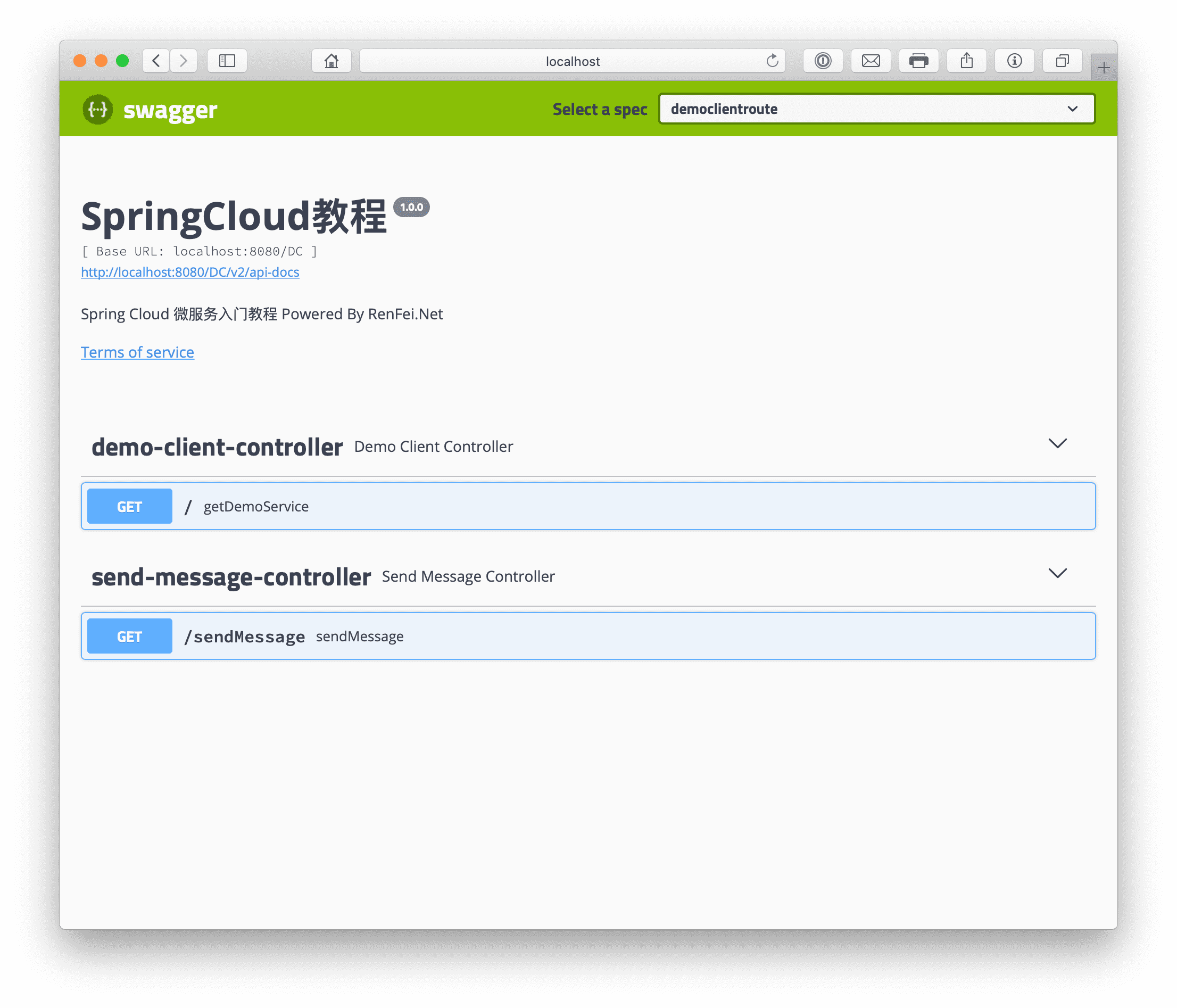
The config class above reads all routes from RouteLocator and manually adds them to the SwaggerResource list. With that, the simple integration is done. Start the registry, config center, each service, and finally the API gateway in order, then visit the gateway address: http://localhost:8080/swagger-ui.html, as shown below: