
Spring Cloud Microservices Beginner Tutorial (1): Microservices Introduction Spring Cloud Microservices Beginner Tutorial (2): Service Registration and Discovery — Eureka Spring Cloud Microservices Beginner Tutorial (3): Service Registration Spring Cloud Microservices Beginner Tutorial (4): Inter-service Invocation — FeignClient Spring Cloud Microservices Beginner Tutorial (5): Centralized Config — ConfigService Spring Cloud Microservices Beginner Tutorial (6): Spring Cloud BUS Message Bus for Dynamic Config Refresh Spring Cloud Microservices Beginner Tutorial (7): Spring Cloud Stream Message-driven Microservices Spring Cloud Microservices Beginner Tutorial (8): Spring Cloud Zuul API Gateway Dynamic Routing, Cookie Passing, and CORS Spring Cloud Microservices Beginner Tutorial (9): Zuul Gateway Integrating Swagger2 for Auto-generated RESTful API Docs Spring Cloud Microservices Beginner Tutorial (10): Spring Cloud Hystrix Circuit Breaking and Service Degradation Spring Cloud Microservices Beginner Tutorial (11): Spring Cloud Sleuth + Zipkin Service Tracing and Link Monitoring Spring Cloud Microservices Beginner Tutorial (12): Spring Cloud Docker Containerized Deployment
Code will be shared at https://github.com/NeilRen/SpringCloudDemo, with different branches for different chapters; the Master branch contains the final combined content. This chapter’s code is at: https://github.com/NeilRen/SpringCloudDemo/tree/feature/config-server
Original This article is original, author: Ren Fei. Please cite the author and source when reposting.
In the previous section “Spring Cloud Microservices Beginner Tutorial (4): Inter-service Invocation — FeignClient” we covered creating microservices and consuming between them. As the number of microservices grows, so do the many Spring Boot programs, and modifying their config files becomes a terrifying workload. So the microservices architecture also provides a config center, which lets us conveniently manage our service config files centrally. At the same time, the production environment config is not open to developers, so only operations staff need to maintain the online config center.
Create a New Config Center Module
Create a module named “config” as the service provided by the config center. How to create a module is covered in previous sections; the code is also on GitHub, so I won’t repeat it here and will only focus on what’s new. “config” needs one more dependency than the “demoservice” from the previous section: spring-cloud-config-server. The POM is:
<?xml version="1.0" encoding="UTF-8"?>
<project xmlns="http://maven.apache.org/POM/4.0.0"
         xmlns:xsi="http://www.w3.org/2001/XMLSchema-instance"
         xsi:schemaLocation="http://maven.apache.org/POM/4.0.0 http://maven.apache.org/xsd/maven-4.0.0.xsd">
    <parent>
        <artifactId>cloud</artifactId>
        <groupId>net.renfei</groupId>
        <version>1.0.0</version>
    </parent>
    <modelVersion>4.0.0</modelVersion>
    <groupId>net.renfei</groupId>
    <artifactId>config</artifactId>
    <version>1.0.0</version>
    <name>config</name>
    <description>Config Center</description>
    <dependencies>
        <dependency>
            <groupId>org.springframework.cloud</groupId>
            <artifactId>spring-cloud-starter-netflix-eureka-client</artifactId>
        </dependency>
        <dependency>
            <groupId>org.springframework.cloud</groupId>
            <artifactId>spring-cloud-config-server</artifactId>
        </dependency>
        <dependency>
            <groupId>org.springframework.boot</groupId>
            <artifactId>spring-boot-starter-web</artifactId>
        </dependency>
    </dependencies>
    <build>
        <plugins>
            <plugin>
                <groupId>org.springframework.boot</groupId>
                <artifactId>spring-boot-maven-plugin</artifactId>
            </plugin>
        </plugins>
    </build>
</project>
Then create a package named net.renfei.config and the application startup class ConfigServerApplication. The code is:
package net.renfei.config;

import org.springframework.boot.SpringApplication;
import org.springframework.boot.autoconfigure.SpringBootApplication;
import org.springframework.cloud.client.discovery.EnableDiscoveryClient;
import org.springframework.cloud.config.server.EnableConfigServer;

@SpringBootApplication
@EnableDiscoveryClient
@EnableConfigServer
public class ConfigServerApplication {
    public static void main(String[] args) {
        SpringApplication.run(ConfigServerApplication.class, args);
    }
}
In the resources folder, add the config file application.yml:
server:
  port: 8114
spring:
  application:
    name: config
  cloud:
    config:
      server:
        git:
          uri: https://github.com/NeilRen/SpringCloudDemo.git
          search-paths: springcloud-config
#          username:
#          password:
#          basedir:
eureka:
  client:
    service-url:
      defaultZone: http://localhost:8761/eureka/
management:
  endpoints:
    web:
      exposure:
        include: "*"
application.yml configures the startup port, application name, and the Eureka registry address, plus the spring.cloud.config.server config — here it means to pull config files from a Git repository. I set it to the GitHub project address, so username and password are not needed; search-paths is the folder where config files are searched.
Add Config Files on Git
Add the service config files on Git. I created DemoClient-dev.yml and DemoService-dev.yml; the address is: https://github.com/NeilRen/SpringCloudDemo/tree/master/springcloud-config. Taking DemoService-dev.yml as an example:
First, the naming rule: {application}-{profile}.yml — the front is the application name, the back is the environment config. So the Dev-environment config file for the DemoService service is named DemoService-dev.yml.
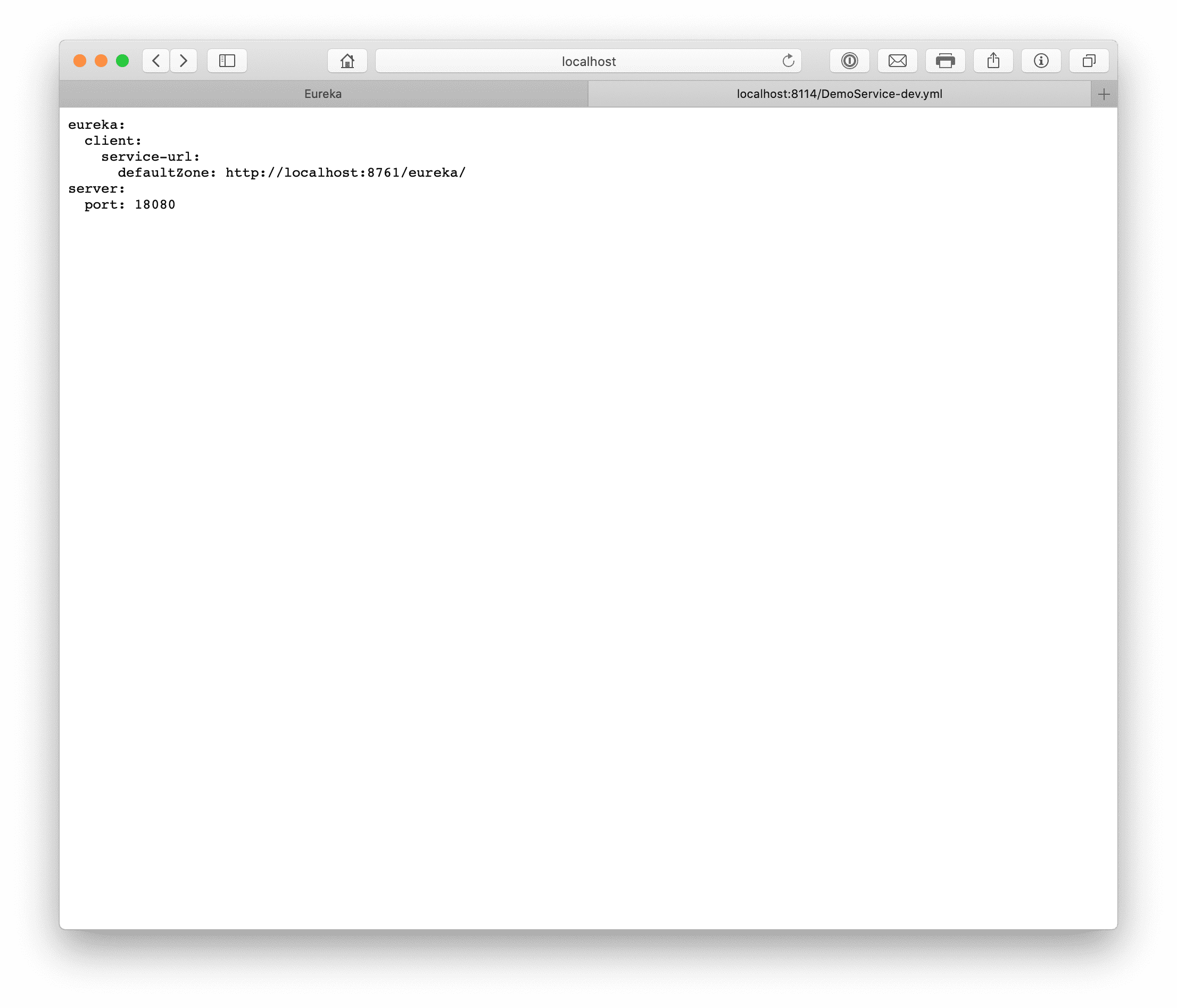
Then the content. Actually, besides application.name and spring.cloud.config-related config, everything else can be put here for remote loading, such as the startup port and database address. In this section my DemoService-dev.yml on Git contains:
server:
  port: 18080
Verify the Config Center
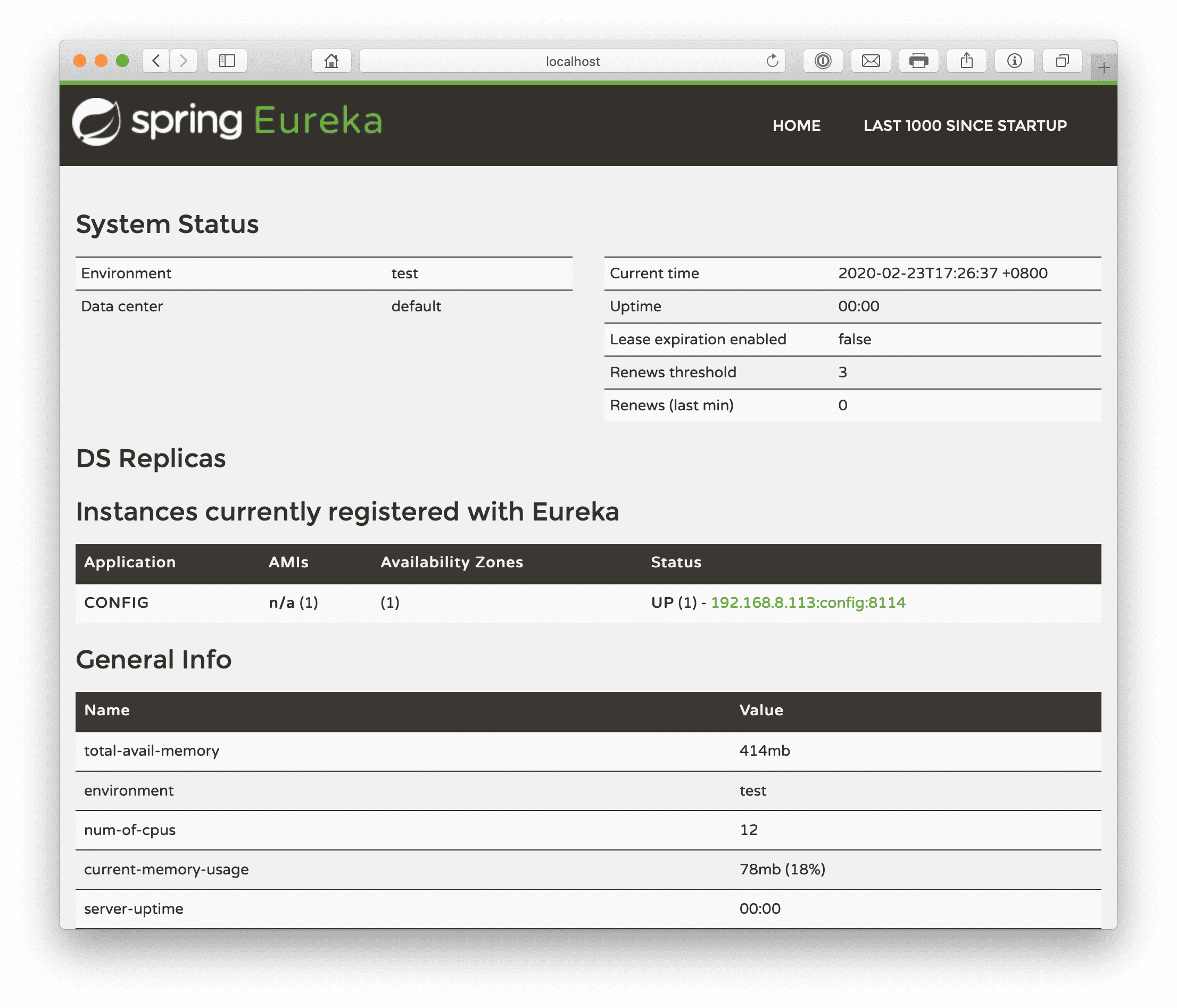
After starting the eureka registry, start the config center. You’ll see config register successfully. The address in this section’s example is: http://localhost:8114/DemoService-dev.yml. It not only supports the yml format — if you visit http://localhost:8114/DemoService-dev.json it auto-converts to JSON. That is, the config center can automatically convert to the config file format you need.
Refactor Services to Pull Config from the Config Center
Taking the DemoService as an example; other services are modified the same way:
Modify the POM to add the spring-cloud-config-client dependency. DemoService example in this section:
<?xml version="1.0" encoding="UTF-8"?>
<project xmlns="http://maven.apache.org/POM/4.0.0"
         xmlns:xsi="http://www.w3.org/2001/XMLSchema-instance"
         xsi:schemaLocation="http://maven.apache.org/POM/4.0.0 http://maven.apache.org/xsd/maven-4.0.0.xsd">
    <parent>
        <artifactId>cloud</artifactId>
        <groupId>net.renfei</groupId>
        <version>1.0.0</version>
    </parent>
    <modelVersion>4.0.0</modelVersion>
    <groupId>net.renfei</groupId>
    <artifactId>demoservice</artifactId>
    <version>1.0.0</version>
    <name>demo-service</name>
    <description>Demo Service</description>
    <dependencies>
        <dependency>
            <groupId>org.springframework.cloud</groupId>
            <artifactId>spring-cloud-starter-netflix-eureka-client</artifactId>
        </dependency>
        <dependency>
            <groupId>org.springframework.boot</groupId>
            <artifactId>spring-boot-starter-web</artifactId>
        </dependency>
        <dependency>
            <groupId>org.springframework.cloud</groupId>
            <artifactId>spring-cloud-config-client</artifactId>
        </dependency>
        <dependency>
            <groupId>net.renfei</groupId>
            <artifactId>apicenter</artifactId>
            <version>1.0.0</version>
        </dependency>
    </dependencies>
    <build>
        <plugins>
            <plugin>
                <groupId>org.springframework.boot</groupId>
                <artifactId>spring-boot-maven-plugin</artifactId>
            </plugin>
        </plugins>
    </build>
</project>
Rename application.yml to bootstrap.yml
Because we need to pull the config file at startup, the previous application.yml no longer suffices; we need bootstrap.yml, so the program pulls the config file from the config center at startup. The bootstrap.yml content is:
spring:
  application:
    name: DemoService
  cloud:
    config:
      discovery:
        service-id: config
        enabled: true
      profile: dev
bootstrap.yml declares the application name and the config center name. service-id is filled with the config center’s name in the registry; profile is which environment’s config file to load.
Following the same refactoring steps, after refactoring the other services you can try using the config center. Note the startup order in my example: eureka registry -> config center -> DemoService service -> DemoClient service.
With this, the config center is built. But every config change still requires a restart, so the next section will cover the Spring Cloud Bus message bus to notify services to pull config automatically. It depends on a new environment: the RabbitMQ message queue. Whether local or via Docker, install it in advance; the next section on Spring Cloud Bus depends on RabbitMQ. See you in the next section.