

Continuing from Part 3, Building on JH GitLab: Security Rises Again, this is Part 4: APIs, So Enchanting.
There’s a JH GitLab project collecting lovely ladies at the end of this post.
Wandering around the garden, Xiaobai ran into the Chief again. He wanted to learn some higher-level skills, so he hurried over to say hello and learn.
Xiaobai: Hello, Chief. I’m familiar with most halls in our organization now. Can you teach me some more advanced techniques?
Chief: You’ve come a long way. Today I’ll introduce you to a mysterious department you normally never see — something like the Brocade Guard. We can’t see them, but they’re beside us at all times.
Xiaobai: Mysterious like that? What can this department do? Why can’t I see it?
Chief: This Brocade-Guard-like department is the API. We never see it, but its power reaches straight into every core department of the association. If you know how to use it, you can do just about anything. Let me introduce it.
GitLab API
The entire organization can be commanded up and down through the mysterious API department. It speaks multiple official languages: REST API and GraphQL API. We’ll start with REST. Before we begin, we need to apply for a Token on JH GitLab — only a valid token lets you issue commands to this mysterious API department.
Once logged in, create a new token in your user settings at https://jihulab.com/-/profile/personal_access_tokens. Give it a name, pick an expiry — leave it unset for a permanent token — and check the scopes, which are the permissions. They mean:
-
api: grants full read/write access to the API, including all groups and projects, the container registry, and the package registry. -
read_api: grants read access to the API, including all groups and projects, the container registry, and the package registry. -
read_user: grants read-only access to the authenticated user’s profile through the/userendpoint, including username, public email, and full name. Also grants access to the read-only endpoints under/users. -
read_repository: grants read-only access to private project repositories using Git-over-HTTP or the Repository Files API. -
write_repository: grants read-write access to private project repositories using Git-over-HTTP (not through the API). -
read_registry: grants read-only access to container registry images on private projects. -
write_registry: grants write access to container registry images on private projects.
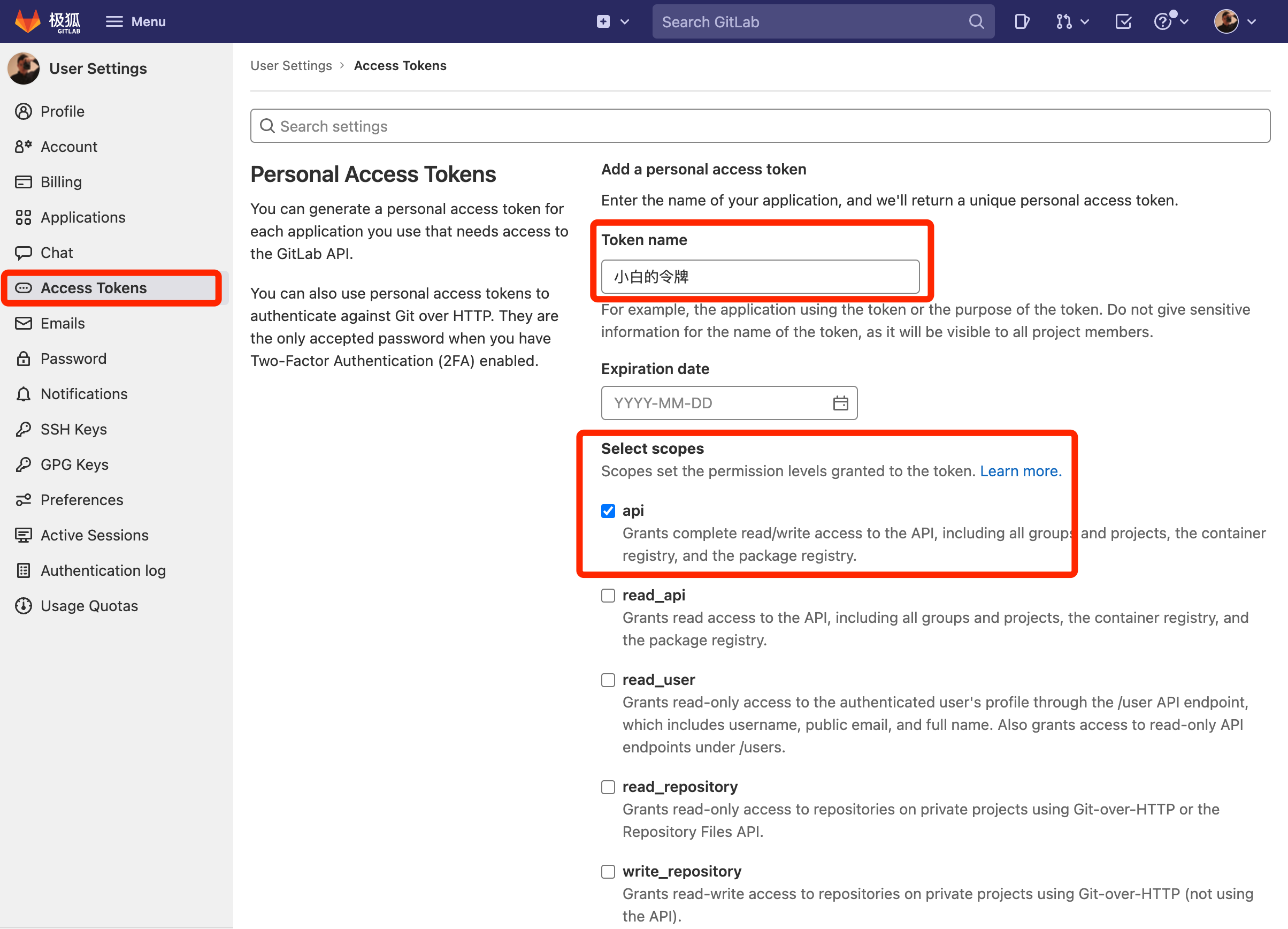
Since we’re here to learn all the APIs, pick api, then click generate:
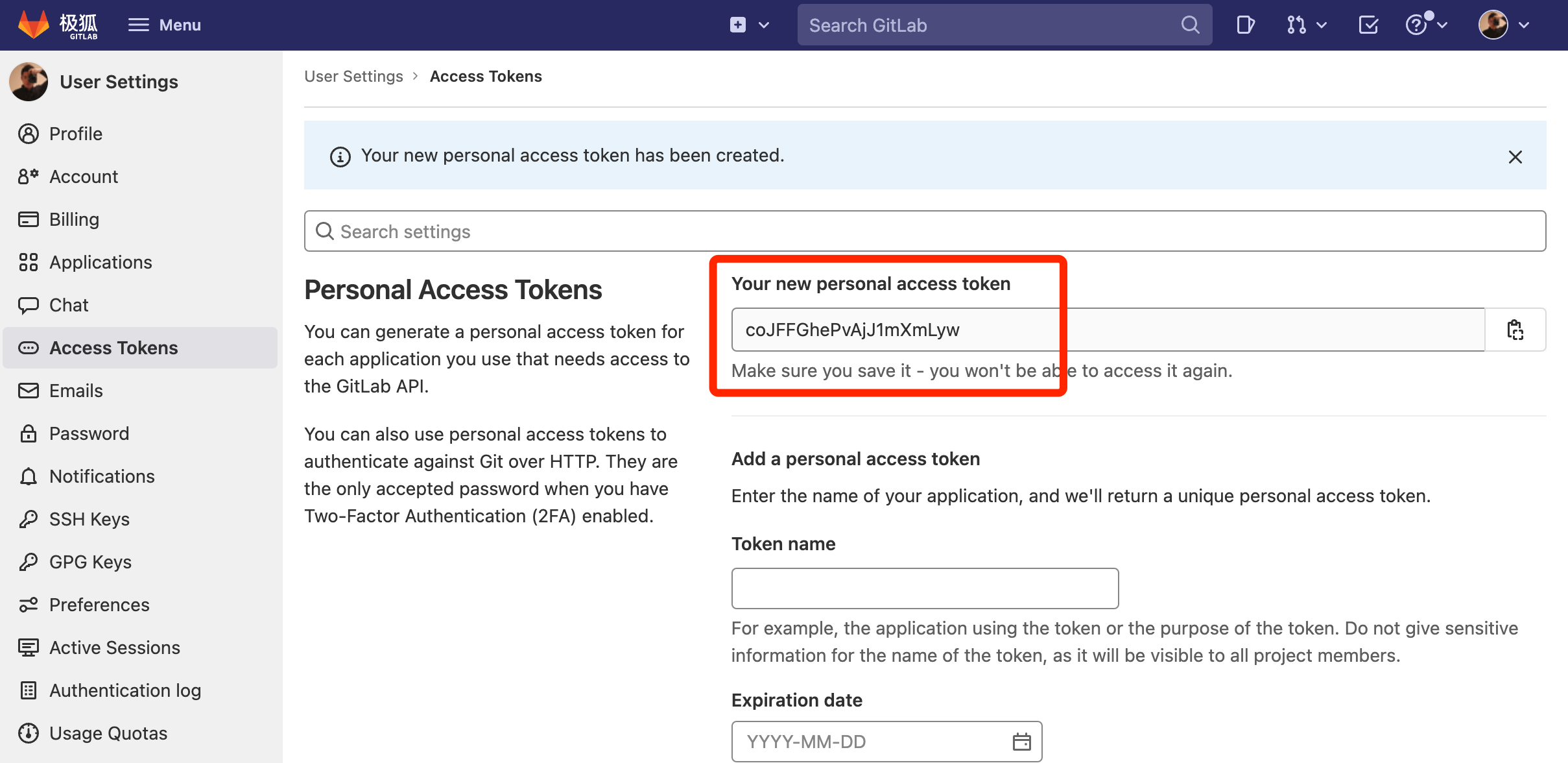
Now we hold the token that commands the API. Guard it well — this token represents you, so its powers are enormous!
The API department roughly splits into three groups: Project, Group, and Standalone. The API is powerful and sprawling — a day wouldn’t be enough to cover it all. To get you started, let’s begin with Standalone, which has nothing to do with projects or groups. Learn one API and the rest come quickly.
Standalone APIs
The Standalone APIs have nothing to do with Groups or Projects — they’re the organization’s independent endpoints. Roughly speaking:
| Resource | Available endpoints |
|---|---|
| Appearance | /application/appearance |
| Applications | /applications |
| Audit events | /audit_events |
| Avatar | /avatar |
| Broadcast messages | /broadcast_messages |
| Snippets | /snippets |
| Custom attributes | /users/:id/custom_attributes (also for groups and projects) |
| Deploy keys | /deploy_keys (also available on projects) |
| Deploy tokens | /deploy_tokens (also available on projects and groups) |
| Events | /events, /users/:id/events (also available on projects) |
| Features flags | /features |
| Geo nodes | /geo_nodes |
| Group activity analytics | /analytics/group_activity/{issues_count} |
| Group repository storage moves | /group_repository_storage_moves |
| Import repository from GitHub | /import/github |
| Instance clusters | /admin/clusters |
| Instance-level CI/CD variables | /admin/ci/variables |
| Issues statistics | /issues_statistics (also for groups and projects) |
| Issues | /issues (also for groups and projects) |
| Jobs | /job |
| Keys | /keys |
| License | /license |
| Markdown | /markdown |
| Merge requests | /merge_requests (also for groups and projects) |
| Metrics dashboard annotations | /environments/:id/metrics_dashboard/annotations, /clusters/:id/metrics_dashboard/annotations |
| Namespaces | /namespaces |
| Notification settings | /notification_settings (also for groups and projects) |
| Pages domains | /pages/domains (also available on projects) |
| Personal access tokens | /personal_access_tokens |
| Plan limits | /application/plan_limits |
| Project repository storage moves | /project_repository_storage_moves |
| Projects | /users/:id/projects (also available on projects) |
| Runners | /runners (also available on projects) |
| Search | /search (also for groups and projects) |
| Service data | /usage_data (GitLab instance admins only) |
| Settings | /application/settings |
| Sidekiq metrics | /sidekiq |
| Sidekiq queue management | /admin/sidekiq/queues/:queue_name |
| Snippet repository storage moves | /snippet_repository_storage_moves |
| Statistics | /application/statistics |
| Suggestions | /suggestions |
| System hooks | /hooks |
| Todos | /todos |
| Topics | /topics |
| Users | /users |
| Validate .gitlab-ci.yml file | /lint |
| Version | /version |
With this many features, which one interests you, Xiaobai? Let’s demo it in detail.
Xiaobai: This powerful? I see a Users endpoint — does that mean even a newcomer like me can pull information about other members of our organization?
Chief: Of course. Whether you’re a regular member or an admin, as long as you can use the API you can do all kinds of powerful things. Let’s use the Users endpoint to get you familiar with how the API works.
Chief: Remember the token we generated above? Take it out, we’re going to use it. JH GitLab’s Users endpoint is https://jihulab.com/api/v4/users. The response is too big to fit on one screen, so I’ll add a parameter to control page size: https://jihulab.com/api/v4/users?page=1&per_page=5
Next, present your token. There are two ways. One is adding access_token directly to the GET parameters, for example: https://jihulab.com/api/v4/users?page=1&per_page=5&access_token=coJFFGhePvAjJ1mXmLyw
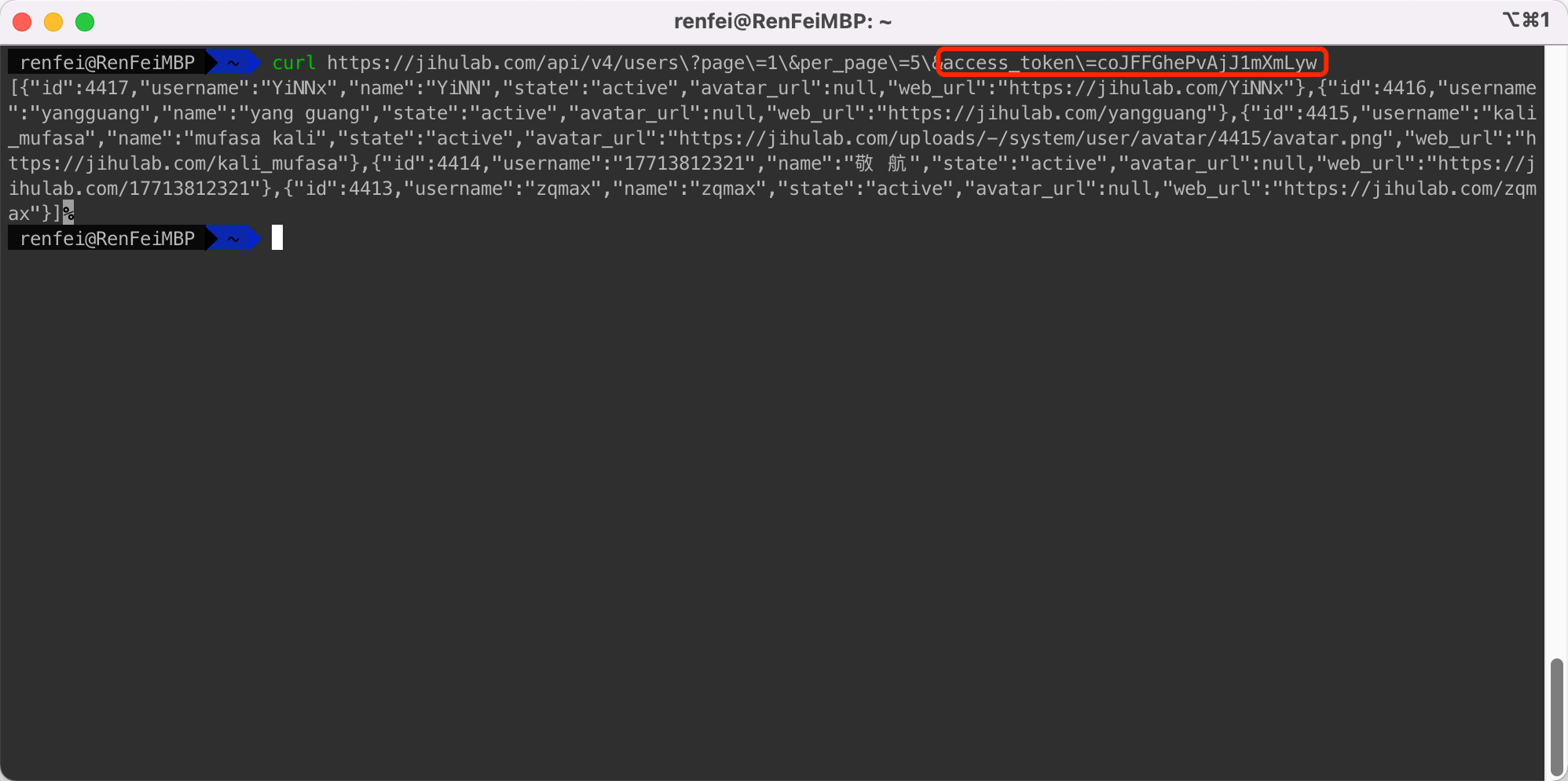
The other is adding PRIVATE-TOKEN: <your_access_token> or Authorization: Bearer <your_access_token> to the request header. For readability I’ll demo with curl, for example:
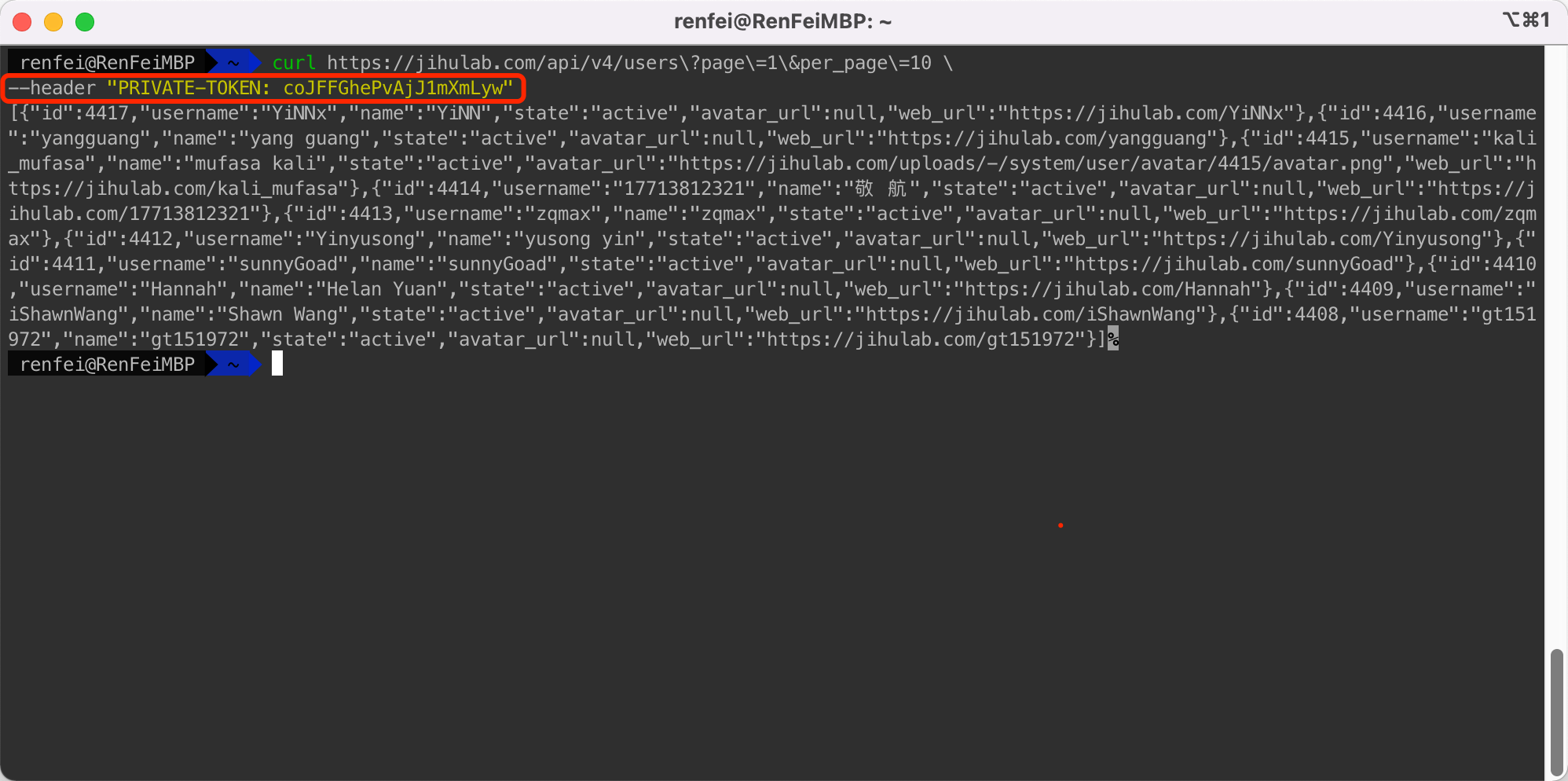
And just like that we’ve called the JH GitLab API. There are many more endpoints like these — you can do nearly anything you want. As long as your skills are high and your imagination wide, you can control the whole world.
Xiaobai: That’s cool. Let me think. If I can get the user list through the API, I can get every member of JH GitLab — then I can see what avatars all our heroes use!
Chief: That works, following your line of thinking. You can pull every hero’s avatar through this mysterious API. Give it a try.
Xiaobai: My code is done. I’ll run it automatically on JH GitLab’s CI/CD, and then I’ll have every hero’s avatar! I even picked out the lovely lady heroes. Take a look:
https://jihulab.com/index.html/beautiful-lady-in-jihu

Chief: Oh, Xiaobai, look at you — learning this fast and already shipping fun projects. Here’s a Star for you. Keep going.
Xiaobai: Thanks, Chief. I’ll go explore what else I can do with it.