
Continuing from Part 2, Building on JH GitLab: Docker Prevails, this is Part 3: Security Rises Again.
After a few days Xiaobai couldn’t sit still and wanted to test his skills out in the jianghu, but the Chief had said his manual might have flaws and vulnerabilities, so he didn’t dare publish. Today he insisted on learning from the Chief how to determine whether his manual had holes. Off he went to headquarters to ask.
Chief: Xiaobai, do you have any idea how busy I am? You’re so eager to learn, fine, I’ll tell you: JH GitLab can audit vulnerabilities for you too. In the Security Hall there are security masters who can scan the manual you wrote, covering Static Application Security Testing (SAST), Infrastructure as Code (IaC) scanning, Dynamic Application Security Testing (DAST), dependency scanning, container scanning, and more.
To turn on security scanning, go to Security Configuration. Some features are premium and not included in the free tier — you need to upgrade your subscription. Since you’re a new member, you can try the premium features free for a month.
-
Static Application Security Testing (SAST): just click Configure with a merge request. It creates a merge request that automatically adds some stages to
.gitlab-ci.yml— for instance it addstemplate: Security/SAST.gitlab-ci.yml, referencing theSecurity/SAST.gitlab-ci.ymltemplate. Later pipelines will run the scan and produce a report. Static scanning examines code only, supports nearly all common languages, and grades each finding by risk level. This is the most widely used scan; I recommend everyone enable it. -
Infrastructure as Code (IaC) scanning: configured the same way as SAST, one button click auto-edits
.gitlab-ci.yml. It scans our infrastructure config files —Dockerfile, Kubernetes manifests and so on — to assess the risk in our container configuration. -
Dynamic Application Security Testing (DAST): also one-click configurable. Dynamic scanning scans our website: give it a URL and it starts scanning, hence “dynamic”. The site has to be verified first, because you can’t scan someone else’s site — imagine finding someone’s vulnerability and exploiting it. Since this scans the whole site, a very large site will eat a lot of CI/CD time. Enable it at your discretion.
-
Dependency scanning: also auto-configurable. It automatically checks whether the third-party libraries our project depends on have publicly reported vulnerabilities, so we know in time whether a dependency is compromised and can upgrade quickly. I recommend enabling this one too.
-
Container scanning: the base images our images build on can have vulnerabilities too. This scans those base images, so once it’s on you never have to worry about whether the containers you build are insecure.
-
Secret scanning: sometimes we accidentally commit passwords, keys, or tokens along with the code. This scans the repo for secrets so we can disable leaked credentials promptly.
Xiaobai said: the Security Hall is impressive. Let me try it. Why won’t it let me use some of these?
The Chief said: features like DAST, dependency scanning, and container scanning are premium — we only offer them to premium members. You’ll need to pay for a subscription to use them, but as a new member you get a free month of the Ultimate tier.
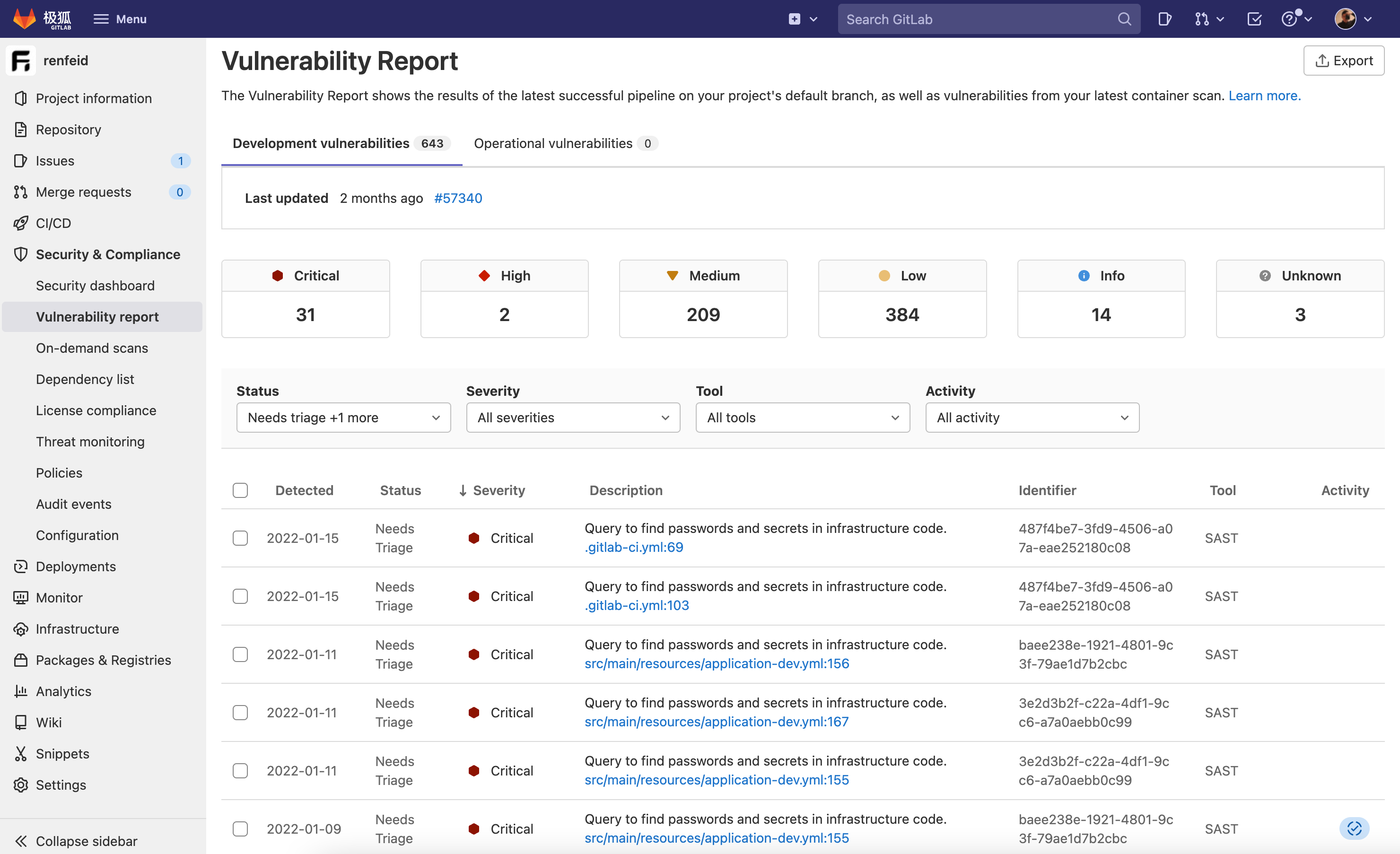
Xiaobai said: let me apply right away. The results are out — so many vulnerabilities! I need to go fix my manual. Thanks, Chief, I’ll come find you again next time.
Chief: hey! Running off that fast, this kid. We still have plenty of techniques left — next time, then.