
Continuing from Part 1, Building on JH GitLab: Java Maven Rules Them All, this is Part 2: Docker Prevails.
Xiaobai was strolling around JH GitLab when he ran into the Chief again and hurriedly stopped him: you promised to teach me Docker cache optimization — come on, tell me now.
Chief: fine, you’re eager to learn. Do you know our JH GitLab association has a Package Warehouse for managing artifacts?
Xiaobai: of course I know, I’ve just never used it. How does it work?
The Package Warehouse
The Chief started explaining the Package Warehouse: it has two parts, Package and Container. Let me cover them separately.
-
Package stores the artifacts we’ve packaged. Since everyone practices different disciplines, we support Maven, npm, NuGet, PyPI, Generic packages, Composer, Conan, Helm, Debian, Go, and Ruby gems registries.
-
Container stores Docker images. Whether an image you built yourself or a public one you pulled, you can push it into our registry.
Pipeline Optimization
Xiaobai, I mentioned caching last time. That centos:centos7 you wrote pulls the image from Docker Hub by default, which relies on the international courier network — far too slow, so it times out constantly. If you pull the Docker image from the international courier first, then push it into our own registry, won’t using it be much faster?
So let’s pull from the official Docker Hub first, then push into our own registry. Take the repo I maintain myself, https://jihulab.com/docker/hub: prefix it with registry.jihulab.com/docker/hub/, and your test stage becomes:
stages:
  - test
test:
  stage: test
  image: registry.jihulab.com/docker/hub/centos:centos7
  services:
    - name: registry.jihulab.com/docker/hub/mariadb:10.6.5
      alias: "mariadb"
    - name: registry.jihulab.com/docker/hub/redis:6.0.1
      alias: "redis"
    - name: registry.jihulab.com/docker/hub/elasticsearch:7.17.0
      alias: "elasticsearch"
      command: [ "bin/elasticsearch", "-Expack.security.enabled=false", "-Ediscovery.type=single-node" ]
  variables:
    MARIADB_DATABASE: renfeid
    MARIADB_ROOT_PASSWORD: root
  before_script:
    - yum install -y wget java-1.8.0-openjdk* which
    - curl -sS https://downloads.mariadb.com/MariaDB/mariadb_repo_setup | bash
    - rpm --import https://yum.mariadb.org/RPM-GPG-KEY-MariaDB
    - yum install -y MariaDB-server galera-4 MariaDB-client MariaDB-shared MariaDB-backup MariaDB-common
    - mariadb --user=root --password="$MARIADB_ROOT_PASSWORD" --host=mariadb $MARIADB_DATABASE
      < environment/db/renfeid.sql --default-character-set=utf8
  script:
    - ./mvnw test -P gitlab -s environment/maven/settings.xml
Now the images come from our own registry. Faster, isn’t it?
Note: watch your repo’s visibility. The Package Warehouse follows the repo’s visibility by default — if your repo is open, the Package Warehouse is publicly downloadable too. To change that, go to Settings Headquarters and set the Container visibility.
Docker Prevails
Xiaobai said: that’s much faster, thank you for the guidance, Chief. Since it can store Docker images, can I build my own images here, like a private Docker Hub?
Chief: of course. That’s one of the services JH GitLab provides. You’re smart — go try it.
Add one more stage on top of the previous article: a release stage that builds the Docker image and publishes it to the JH GitLab Container registry.
After some exploration — we’ll skip the Dockerfile — Xiaobai wrote the .gitlab-ci.yml on top of the previous article as follows:
stages:
  - release
release:
  stage: release
  image: docker:latest
  services:
    - docker:dind
  script:
    - docker build -t $CI_REGISTRY_IMAGE:$CI_COMMIT_TAG .
    - docker login --username=$CI_REGISTRY_USER --password=$CI_REGISTRY_PASSWORD $CI_REGISTRY_IMAGE
    - docker push $CI_REGISTRY_IMAGE:$CI_COMMIT_TAG
  dependencies:
    - package
Breaking that down: pick docker:latest as the runtime, then use docker:dind as the base image for the build. $CI_COMMIT_TAG reads the tag from Git.
After some hard work Xiaobai finally succeeded, and then registered registry.jihulab.com on his own server so he could pull the Docker image. Look at the results:
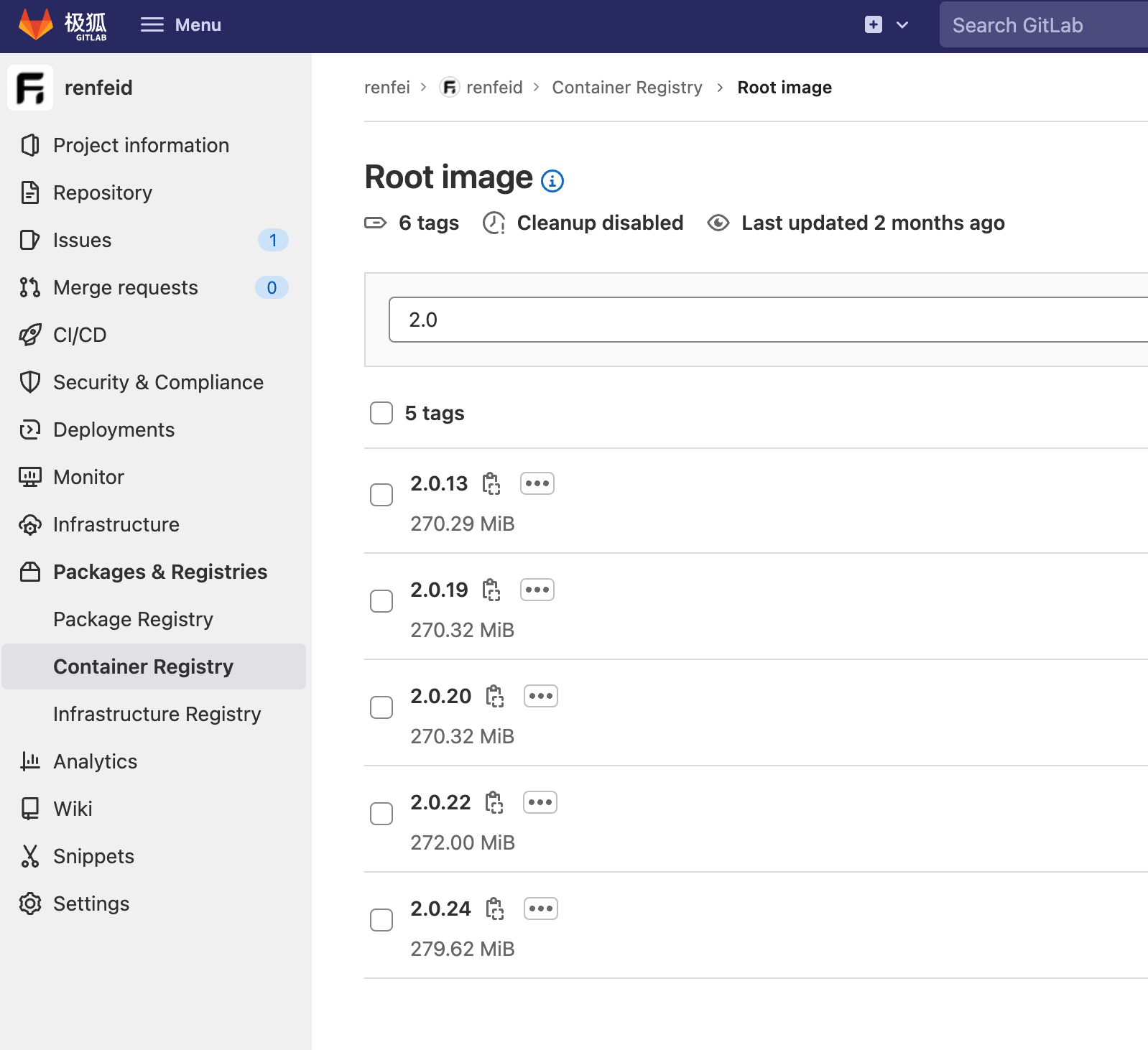
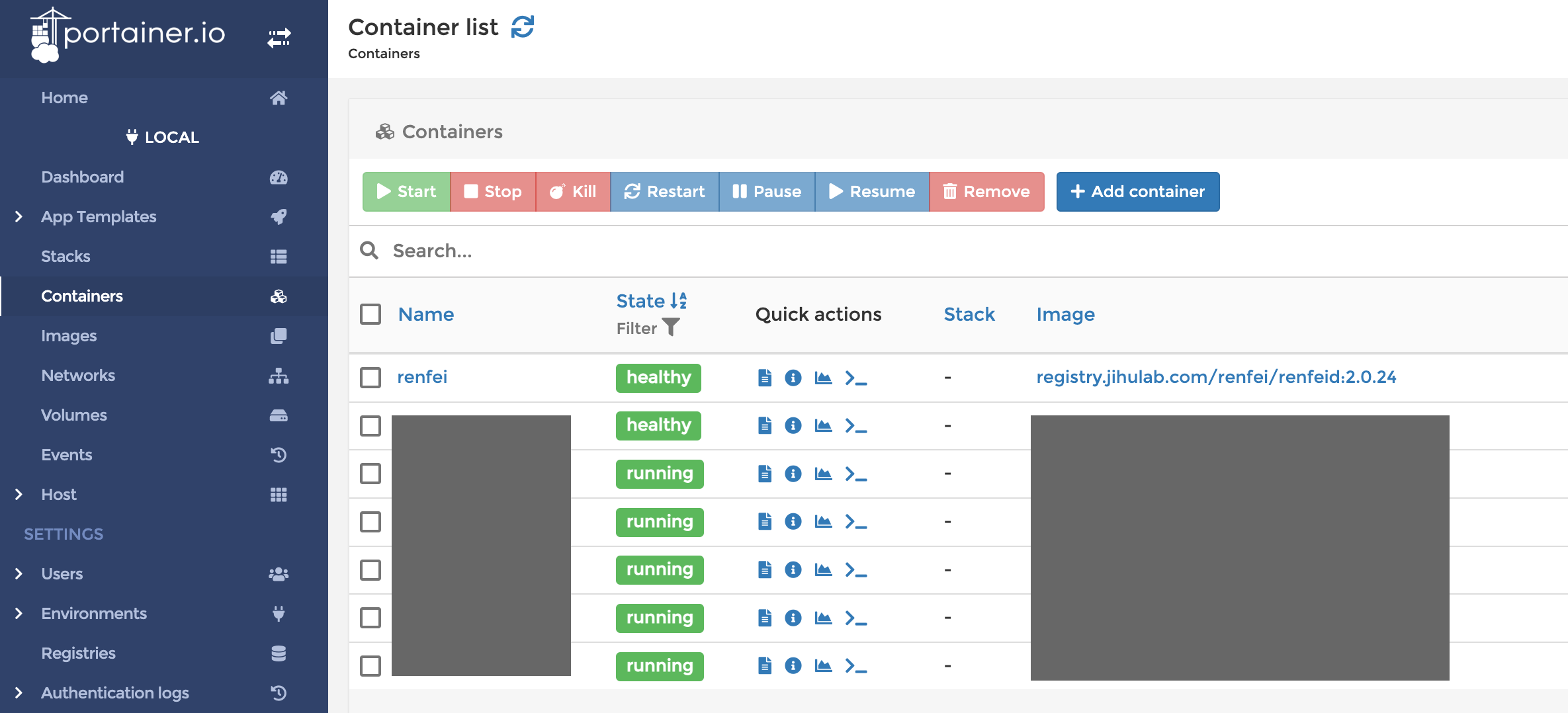
At this point the manual is basically complete, and Xiaobai itched to go show his moves out in the jianghu — but the Chief stopped him. The Chief said: Xiaobai, you’ve improved fast, but do you know your manual may still have openings — vulnerabilities or weak spots? Our JH GitLab association can audit those for you too. It’s getting late again, and I have a meeting back at headquarters. Next time.
To be continued — next up: Building on JH GitLab, Part 3: Security Rises Again.