
I connected my Spring Boot main site with a Discuz! forum so login and logout are synchronized, and member data from Discuz! can be shown back on my site. I also modified the previously open-sourced discuz-ucenter-api-for-java to fit the way Spring Boot is written today.
Thanks to Open Source First
Integrating with Discuz! generally works either over an API or directly against the database. This post covers the API route, which means talking about discuz-ucenter-api-for-java — and first, thanks to the original author, Liang Ping (no_ten@163.com), for open-sourcing his code. It saved us a great deal of time.
Reworking the Open Source Code
After downloading the source I found it was still code from 2009, thoroughly retro in style. The original author had translated it from the PHP implementation, so a lot of the conventions weren’t Java conventions. It also required configuring a servlet and didn’t support Maven builds — completely out of place in a modern Spring Boot project. So I modified the source and re-published it.
To fit the Maven-built Spring Boot style, here’s what I changed (project at https://github.com/renfei/discuz-ucenter-api-for-java):
-
Published the package to Maven Central.
-
Targeting today’s JDK 8: removed the original author’s Base64 implementation in favor of
java.util.Base64from JDK 8, so JDK 8 is the minimum runtime. -
Changed underscore method names to camelCase —
uc_user_delete()becameucUserDelete(), for example. -
Changed PHP-style variable names to ordinary Java ones —
String $modulebecameString module. -
Replaced the configuration-file approach with constructor parameters at instantiation time.
-
Replaced the servlet configuration with defining your own Controller and handling
HttpServletRequestandHttpServletResponse. -
Fixed several Chinese garbled-text issues.
Configuring Discuz UCenter
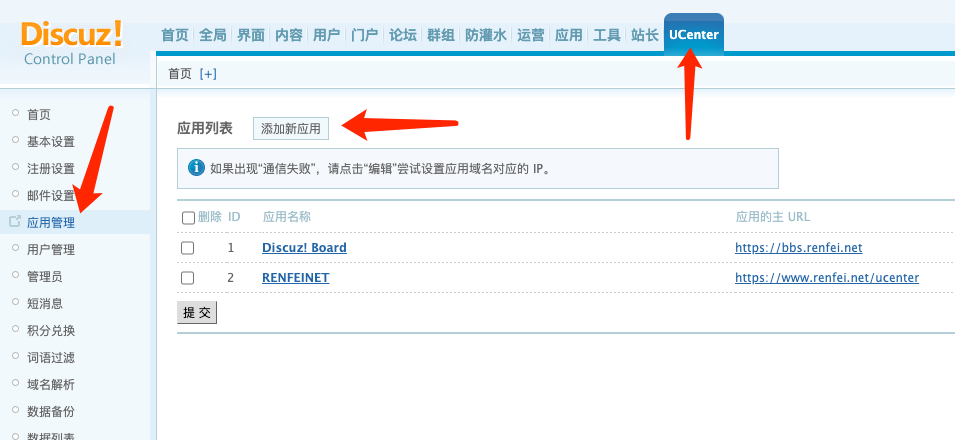
Before integrating, you need to configure Discuz’s UCenter and get the interface address, communication key, and APP ID. Go to UCenter in the Discuz admin panel and add an application:
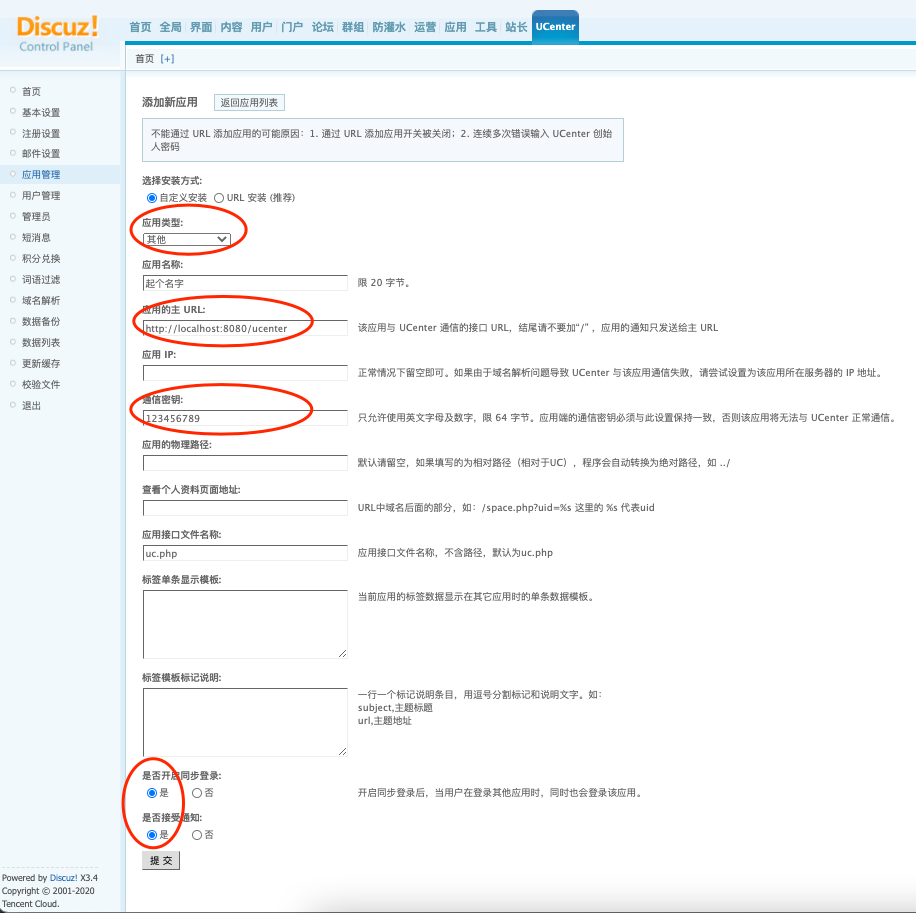
Then fill in the configuration. Pick “Other” as the application type, give the application a name, fill in your own site URL for the application URL, set whatever password you like as the communication key, and at the bottom enable synchronized login and accepting notifications:
Integrating discuz-ucenter-api-for-java Into Spring Boot
I’m using a Maven-built Spring Boot project, so first edit pom.xml to pull in discuz-ucenter-api-for-java:
<dependency>
  <groupId>net.renfei</groupId>
  <artifactId>discuz-ucenter-api-for-java</artifactId>
  <version>1.0.6</version>
</dependency>
I think of it as two parts: acting as a client that receives messages from Discuz’s UCenter, and actively sending messages to Discuz’s UCenter. Let’s take them separately.
Receiving Messages From Discuz’s UCenter
Create a controller, then a method that handles HttpServletRequest and HttpServletResponse, mapped to the UCenter request address with @RequestMapping("/api/uc.php"). Instantiate a net.renfei.discuz.ucenter.api.UCClient client and a net.renfei.discuz.ucenter.client.Client, hand the HttpServletRequest to net.renfei.discuz.ucenter.api.UCClient.doAnswer(), and finally write the result into the HttpServletResponse. If UCenter is configured correctly, you should see communication working normally in UCenter. Here’s a concrete example:
@Controller
public class UCenterController {
    @ResponseBody
    @RequestMapping("/api/uc.php")
    public void uc(HttpServletRequest request, HttpServletResponse response) throws IOException {
        UCClient ucClient = new UCClient();
        Client client = new Client("http://localhost:8080/uc_server", null, "123456789", "3","");
        String result = ucClient.doAnswer(client, request, response);
        response.getWriter().print(result);
    }
}
Actively Sending Messages to Discuz’s UCenter
Register
Client client = new Client("http://localhost/uc_server", null, "key", "2","");
String string = client.ucUserRegister("username","password","email");
Log In, Then Sync the Login
Client client = new Client("http://localhost/uc_server", null, "key", "2","");
// Login
String result = client.ucUserLogin(uid);
LinkedList<String> rs = XMLHelper.ucUnserialize(result);
if(rs.size() > 0){
    int uid = Integer.parseInt(rs.get(0));
    String username = rs.get(1);
    String password = rs.get(2);
    String email = rs.get(3);
    if(uid > 0) {
        // Synchronized login
        String string = client.ucUserSynlogin(uid);
        // Local login code
        //TODO ... ....
    } else if(uid == -1) {
        System.out.println("User does not exist, or was deleted");
    } else if(uid == -2) {
        System.out.println("Wrong password");
    } else {
        System.out.println("Undefined");
    }
}else{
    System.out.println("Login failed");
    System.out.println(result);
}
Log In
Client client = new Client("http://localhost/uc_server", null, "key", "2","");
String string = client.ucUserLogin("username","password");
Synchronized Login
Client client = new Client("http://localhost/uc_server", null, "key", "2","");
int UID = 21; // the user's UID
String string = client.ucUserSynlogin(uid);
Common Problems
The Sync Login Call Succeeds but There’s No Login State
-
Symptoms: calling
net.renfei.discuz.ucenter.client.Client#ucUserSynloginsucceeds, you get back JavaScript, requesting the JS address also succeeds — but visiting Discuz shows no login state. Inspect the response headers of the JS request and there’s noxxxx_2132_authcookie inSet-Cookie. -
How I hit it: first call
net.renfei.discuz.ucenter.client.Client#ucUserRegisterto register the user, thennet.renfei.discuz.ucenter.client.Client#ucUserLoginto log in and get the uid, thennet.renfei.discuz.ucenter.client.Client#ucUserSynloginto sync the login and get the JavaScript. The browser requests the JS address. Everything reports success, but visiting Discuz still shows no login state. -
Root cause: after
ucUserRegisterruns, the user is inserted into UCenter’spre_ucenter_memberstable, but it is not automatically inserted into the Discuz forum’spre_common_membertable. So the synchronized login succeeds, but when you visit Discuz there’s no record of this user, and therefore no login state. -
Solutions: option one — handle registration by connecting to the database directly and inserting the user’s data into both the UCenter and Discuz user tables; the tables involved are documented, and I won’t enumerate them here. Option two — modify UCenter’s code so that inserting into the UCenter user table also inserts into the Discuz user table.
-
In summary: UCenter is only a bridge that links user accounts across applications. It does not notify each application that a new user exists. When Discuz’s own login page can’t find a user, it pulls that user’s info from UCenter and inserts it into its own user table. So if you register a user through the UCenter registration API and that user has never logged in to Discuz, Discuz has no record of them. If you want unified login verification, you have to insert the relevant rows into Discuz’s user tables yourself — several tables are involved, so consult the official documentation.
For more, read the source; I won’t walk through every case here. You can open an issue or discuss it with me on my community forum: https://bbs.renfei.net/forum-44-1.html