

Update, April 2021: GitHub no longer reviews requests to release dormant or inactive account names. Trademark law is now the only route to obtain a username.
Being able to claim an occupied GitHub username comes down to GitHub’s username policy — the GitHub Username Policy. Two clauses in it can be used:
1. Trademark policy
If you believe someone’s account infringes your trademark rights, you can find more information about trademark complaints on our trademark policy page.
2. Name squatting policy
GitHub prohibits name squatting, and account names may not be held inactive for future use. Accounts that violate this name squatting policy may be removed or renamed without notice. Attempting to sell, buy, or solicit other forms of payment in exchange for an account name is prohibited and may result in permanent account suspension.
Step 1: Confirm the Username You Want Is Inactive
Visit the username you want and look at its activity. If the owner is still active, forget it — you won’t get it. When I looked at https://github.com/renfei, the account had nothing under it: no repositories, no public profile information, not even an avatar. One caveat, though: not all activity on GitHub is public, so an account with no visible activity may still be in use. If the owner only ever uses private repositories and never publishes anything, they won’t hand over the username either.
Step 2: Ask GitHub Whether the Username Can Be Released
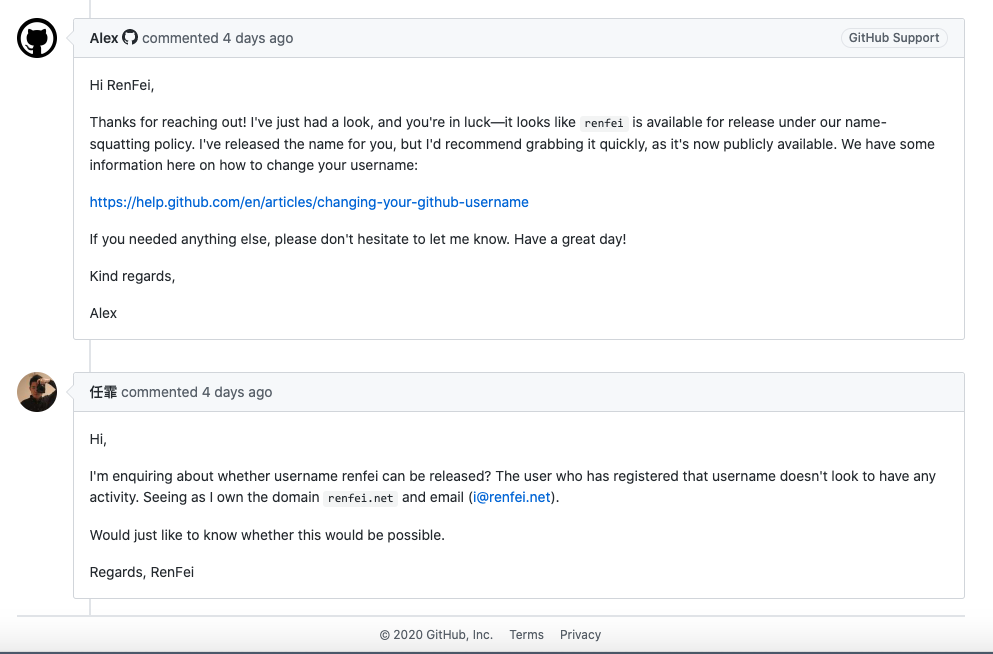
Contact GitHub in English and ask whether the username can be released, then wait for a reply. If you’re lucky it gets released right away, and you need to change your name quickly — if someone else happens to register it, all your effort was for nothing. Here’s my conversation log:
Step 3: Change Your Username
You might worry that changing your username will 404 your old repository URLs. Don’t. Clever GitHub has already planned for this: repository URLs from before the rename automatically redirect to the repositories under your new username — unless someone creates a repository with the same name under your old username, in which case it gets shadowed and the redirect stops working. So you can create an organization using your old username to prevent anyone else from registering it. But to stop someone from also taking your old username by contacting GitHub, you should occasionally generate some activity in the repositories under the old name.
Finally — may you all get the username you want.