
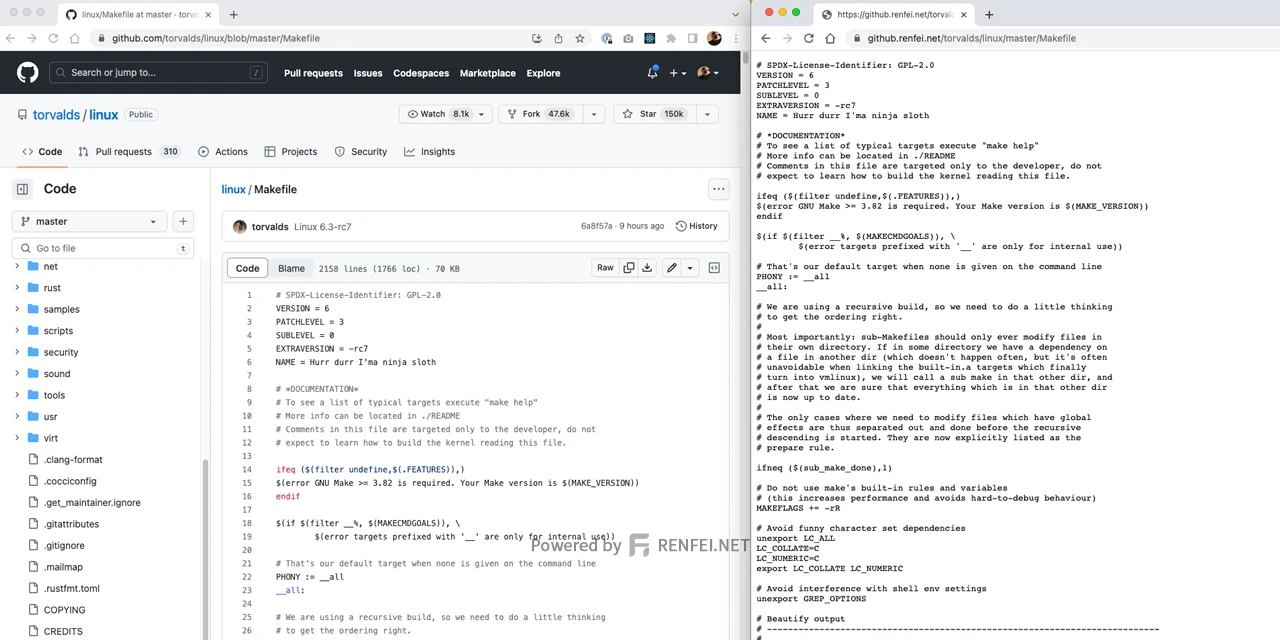
github.renfei.net used to fully proxy GitHub pages to work around slow GitHub access from Mainland China. But the service ran into problems, so it no longer proxies full pages — only specific files.
Why full proxying had to stop
Previously, github.renfei.net fully proxied GitHub pages — identical to using GitHub, including pages, features and forms. But that made security vendors flag my domain as a phishing site: I had pages and functionality identical to GitHub, login page included, so I got classified as a dangerous phishing site impersonating GitHub.
Once a security vendor flags you as phishing or malicious, everything from browsers to search engines blocks you. So I can no longer offer a full GitHub proxy.
File proxying
Don’t despair — github.renfei.net still works, just differently: it now proxies specific files only. A few examples.
Say you want to share a GitHub file in a blog, forum, or WeChat, but worry the recipient can’t open GitHub. The original URL: https://github.com/torvalds/linux/blob/master/Makefile
Replace it with: https://github.renfei.net/torvalds/linux/master/Makefile
Swap github.com for github.renfei.net and drop the blob segment.
Proxying specific branches or versions
Want to share a file from a different branch or commit? Besides the example above, replace master with another branch name — or a commit id directly:
https://github.renfei.net/torvalds/linux/09a9639e56c01c7a00d6c0ca63f4c7c41abe075d/Makefile
github.renfei.net ensures that in most regions, GitHub files are reachable whether or not GitHub itself is.