
What Is BitTorrent?
If you’re reading a guide on making torrents you’re probably new to this, so let me introduce BitTorrent first — skip ahead if you like, it isn’t required.
BT is short for BitTorrent, a content distribution protocol. Under the BitTorrent protocol, the publisher generates a .torrent file — a seed file, or just “seed” — from the file being published. A .torrent file is essentially a text file containing two parts: tracker information and file information. A tracker server acts like a broadcast station, letting peers tell each other who has the file or is downloading it. This site runs one too: http://tracker.renfei.net:8080/announce.
The file information is computed from the target file: the file being shared is virtually divided into equally sized blocks, where block size must be an integer power of 2 KB, and each block’s index and hash verification code is written into the seed (.torrent) file. So the seed file is an “index” to the file being downloaded.
Creating a Torrent and Magnet Link
The simplest route is to create it directly in a BitTorrent client. I’ll demonstrate with BitComet.
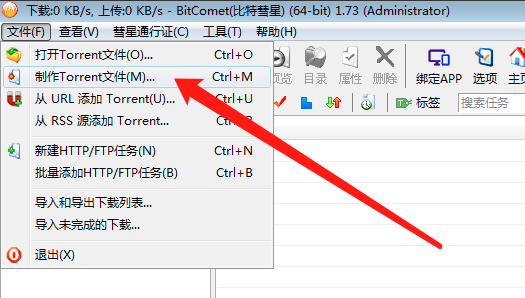
First, click File, then Make Torrent File.
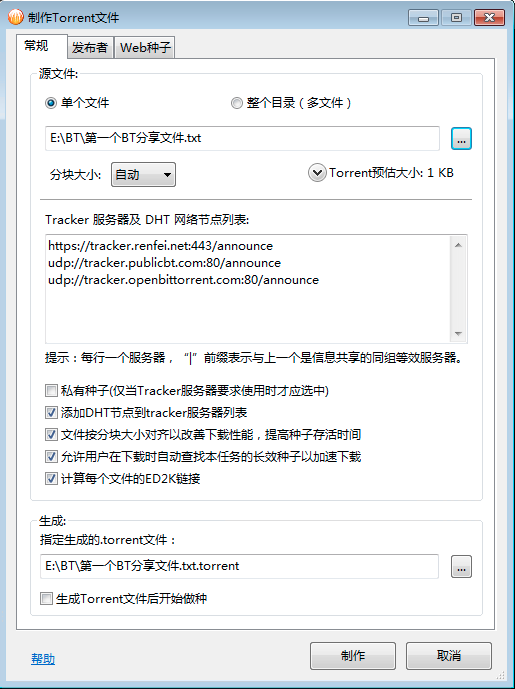
Then choose the file or folder you want to share, and fill in the tracker servers and DHT network node list:
http://tracker.renfei.net:8080/announce
udp://tracker.renfei.net:8080/announce
udp://tracker.publicbt.com:80/announce
udp://tracker.openbittorrent.com:80/announce
I’m using the tracker this site provides, http://tracker.renfei.net:8080/announce — but to keep your seed alive you can add more trackers, and a search will turn up lists of them. I recommend this GitHub project, which maintains a large list: https://github.com/XIU2/TrackersListCollection
You can also fill in publisher information such as name, URL and description; none of it is required, so feel free to leave it blank.
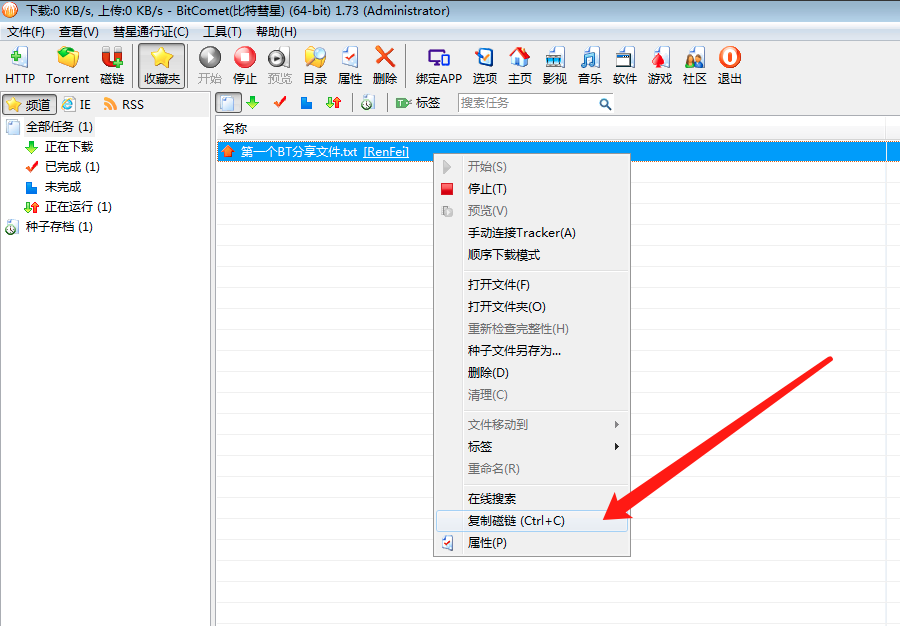
Click Make and you’ll get a .torrent file, which now appears in our task list. We still need to click Start so it joins the network and others can download it. Right-click the new task and choose “Copy Magnet Link” to get the magnet URI. That’s it — you’ve created a BitTorrent seed and magnet link. Here are the ones from this tutorial; give them a try.
- Torrent file from this tutorial: https://cdn.renfei.net/bt/第一个BT分享文件.txt.torrent
- Magnet link from this tutorial: magnet:?xt=urn:btih:KDHSNAX4IYXOAMC4CBLWJCEJEIF5AMJS
Come share your knowledge and thoughts on the community: BT/PT section - Software Technology Community
Things to Watch
Right after you publish a seed, you’re the only person on the network holding the complete file, so you can’t go offline — you have to keep serving others, i.e. seeding. Once you go offline the seed is temporarily dead, because nobody else on the BT network has the file. Wait a while, and once enough people have downloaded and are seeding, you can go offline — which is why the more downloaders there are, the faster it goes.
Likewise, others find you through trackers, so the more trackers you connect to, the easier you are to find — link up with plenty of them.
Why Some Trackers Won’t Connect
That’s normal: trackers are spread around the world and network conditions make some unreachable. HTTPS links also succeed more often, since plaintext HTTP and UDP are frequently interfered with or throttled by ISPs. And because Xunlei gave BT downloading in China a bad name, some overseas trackers block connections from China.
Why Downloads Have No Speed
On the BT network your download speed comes from other users uploading to you — there may be few users holding what you need. Trackers help you find more users and establish connections between you; the more peers you connect to, the faster the download.
Then there’s Xunlei’s leeching, which relates to the bad reputation mentioned above: Xunlei enjoys upload speed from other BT clients’ users, but offers its own upload only to other Xunlei users, never to other BT clients. So from other clients’ perspective, Xunlei takes and never gives — the infamous “leech thunder”.
For more detail, I recommend this article: Why Is the BT Environment in China So Bad and Download Speeds So Poor? Six Reasons…