

The blogger is about to leave school for an internship and also needs to rent a place, considering buying a Xiaomi Router, but there are two choices: Xiaomi Router or Xiaomi Router mini?
 Xiaomi Router
It’s quite a dilemma — which to choose? Let me share my view.
Xiaomi Router
The performance parameters are beyond reproach, better than the mini, but what I worry about is the hard drive and fan. A router, as a 24-hour non-power-off device, can’t turn off its hard drive — meaning 24-hour power supply; even if the hard drive isn’t reading or writing, as long as it’s powered, it spins, causing reduced hard drive lifespan and heat issues. Then there’s the fan issue — the fan runs 24 hours non-stop; over time, it’ll probably be full of dust inside. A laptop isn’t on 24 hours and still gets a bunch of fuzz inside; I worry the fan will make the router dirty beyond recognition, and there’ll be noise, and the hard drive will also make noise.
Xiaomi Router mini
Although the performance parameters aren’t as strong as the Xiaomi Router, it’s enough, and it’s cheaper. You might regret no hard drive, no NAS function — don’t worry, didn’t they prepare a USB port for you? Just buy a USB drive with fast read/write speed; the size is also your choice. We know a USB drive is flash memory, no mechanical rotation, no noise, and less heat than a hard drive — I feel it’s much better than a hard drive. Besides, a 1TB hard drive — once you finish watching a movie you delete it; who keeps watching it endlessly? Right? Even if you regret it, it’s only about 100 RMB, and you can go buy the 699 Xiaomi Router. Another point of view: the Xiaomi Router has been out for a year; will there be a Xiaomi Router 2nd gen, is it worth buying now? Personally, I think the chance of releasing a Xiaomi Router 2nd gen now is small — smart home hasn’t come out yet, and the 1st gen product isn’t figured out, so they probably won’t rush to release the 2nd gen. If you’re worried, just buy the Xiaomi Router mini; it’s cheap, and if the 2nd gen releases, you can buy that too. Overall I think it’s better to buy the mini first.
Addendum: I forgot to tell everyone about the port speeds, sorry, adding it now. Speed: The Xiaomi Router’s LAN port is gigabit, theoretical transfer speed up to 125MB/s. The Xiaomi Router mini’s LAN port is 100M, theoretical transfer speed up to 12MB/s. Friends needing high-speed experience can only choose the Xiaomi Router. Finally, a supplement of their parameter configurations:
| Xiaomi Router mini | Xiaomi Router | |
|---|---|---|
| Size / Weight / Color | 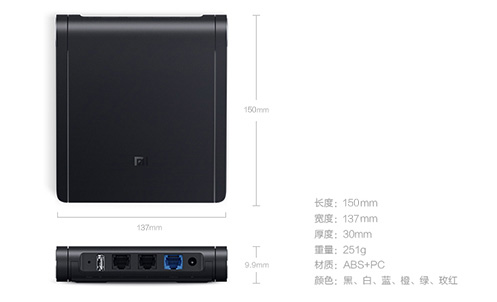 |  |
| Hardware Configuration — Processor | MT7620A 580MHz | BCM4709 Cortex-A9 dual-core 1.0GHz |
| Hardware Configuration — ROM | 16MB SPI Flash | 16MB SPI Flash |
| Hardware Configuration — Memory | 128MB DDR2 | 256MB DDR3-1600 |
| Hardware Configuration — Hard Disk Storage | None | 2.5-inch 1TB |
| Hardware Configuration — 2.4G WiFi | 2*2 (max 300Mbps) | 2*2 (max 300Mbps) |
| Hardware Configuration — 5G WiFi | 2*2 (max 867Mbps) | 2*2 (max 867Mbps) |
| Hardware Configuration — Antenna | External dual-band omnidirectional antennas x2 | Internal dual-band omnidirectional antennas x2 |
| Whole-machine Interface | 1 USB 2.0 (DC out 5V/1A); 2 10/100M LAN (Auto MDI/MDIX); 1 10/100M WAN (Auto MDI/MDIX); 1 tri-color LED; 1 reset button; 1 power input | 1 USB 2.0 (DC out 5V/1A); 2 10/100/1000M LAN (Auto MDI/MDIX); 1 10/100/1000M WAN (Auto MDI/MDIX); 1 tri-color LED; 1 system standby/reset button; 1 power input; NFC tag storage (144Bytes) |
| Software Parameters — Operating System | MiWiFi ROM (OpenWRT-based) | MiWiFi ROM (OpenWRT-based) |
| Software Parameters — Supported Languages | Simplified Chinese | Simplified Chinese |
| Software Parameters — Advanced Management | Root access + native toolchain/SDK | Root access + native toolchain/SDK |
| Software Parameters — Wireless Security | WPA-PSK/WPA2-PSK, MAC filtering, SSID hiding | WPA-PSK/WPA2-PSK, MAC filtering, SSID hiding |
| Software Parameters — Open Platform | Video plugins (Xunlei Cloud Acceleration, Xunlei Cinema, etc.) | Xunlei, Kingsoft Cloud, Sogou plugins; third-party dev tools |
| Software Parameters — Management App | Web, Windows, Android, MacOS, iOS | Web, Windows, Android, MacOS, iOS |
| Product Accessories | Manual x1; Warranty card x1; Power (12V/1A) x1 | Manual x1; Warranty card x1; Power (12V/2.5A) x1 |
| Protocol Standards | IEEE 802.11a/b/g/n/ac, IEEE 802.3/3u | IEEE 802.11a/b/g/n/ac, IEEE 802.3/3u/3ab |
| Certification Standards | GB9254-2008 YD/T993-1998 GB4943.1-2011 | GB9254-2008 YD/T993-1998 GB4943.1-2011 |
| Operating Environment — Operating Temperature | 0-40℃ | 0-40℃ |
| Operating Environment — Operating Humidity | 10%-90%RH (non-condensing) | 10%-90%RH (non-condensing) |
| Operating Environment — Storage Temperature | -40-70℃ | -40-65℃ |
| Operating Environment — Storage Humidity | 5%-90%RH (non-condensing) | 5%-90%RH (non-condensing) |
| Warranty Information | 1-year whole machine warranty | 1-year whole machine warranty |