
This is a working-use post — simple explanations only, no deep dives.
Friendly reminder
If you’re not comfortable with the command line, use a GUI — there are plenty of Git GUIs, like Fork, Sourcetree and so on.
This post is about personal, local, single-machine Git operations — not the GitFlow management process. Don’t confuse the two.
Git Merge vs Rebase
One thing I have to rant about: I see tons of Merge commits in projects, but that’s not how Merge is meant to be used. Most of the time, you should be rebasing.
First, for the demo, set up two branches: master and renfei. Master is our baseline branch — all conflicts and changes defer to it. Renfei is my personal dev branch where I do my work.
If someone commits new functionality on master that I depend on, or I want to avoid future conflicts, I want to pull master’s content into my renfei branch. That’s when you use git rebase — rebase my renfei branch onto master’s current tip.
If I’ve finished my feature and want to contribute it to master, that’s when you use git merge — merge my renfei branch into master, producing a merge commit.
Understanding Git Rebase
Plain language and pictures — maybe not rigorous, just the idea.
In git, every commit is a node, and the commits form a chain, like a linked list. Just by changing the list’s pointers you can quickly edit that chain. So rebase, as I understand it, looks like this:
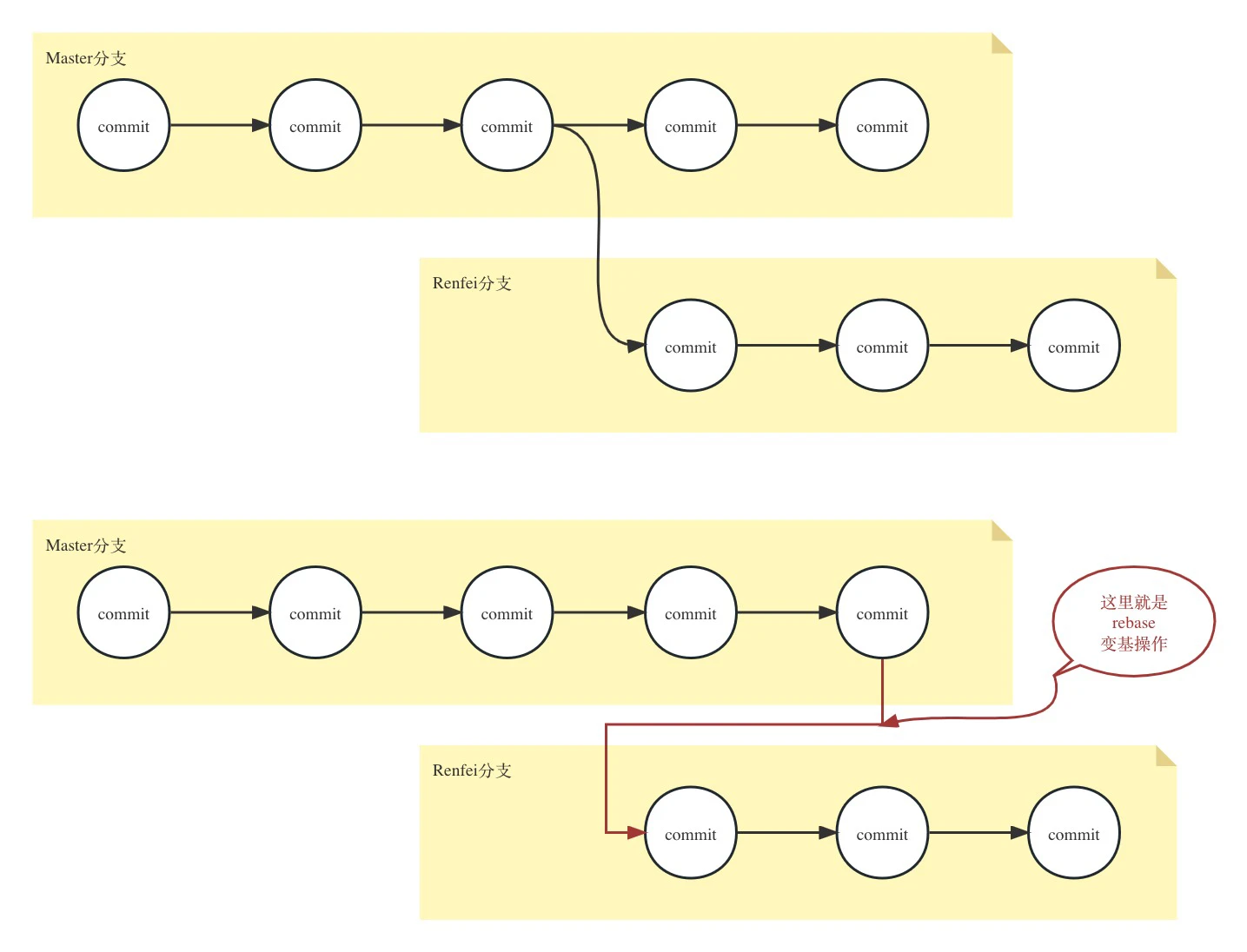
Since master keeps getting commits, my chain has fallen behind. Just repoint the list’s pointers at the latest node, and master’s changes are pulled into my branch.
Understanding Git Merge
Again, plain language and pictures — just the idea.
My understanding: merge bundles all of a branch’s changes into one commit and attaches it to the target branch as a new commit, like this:
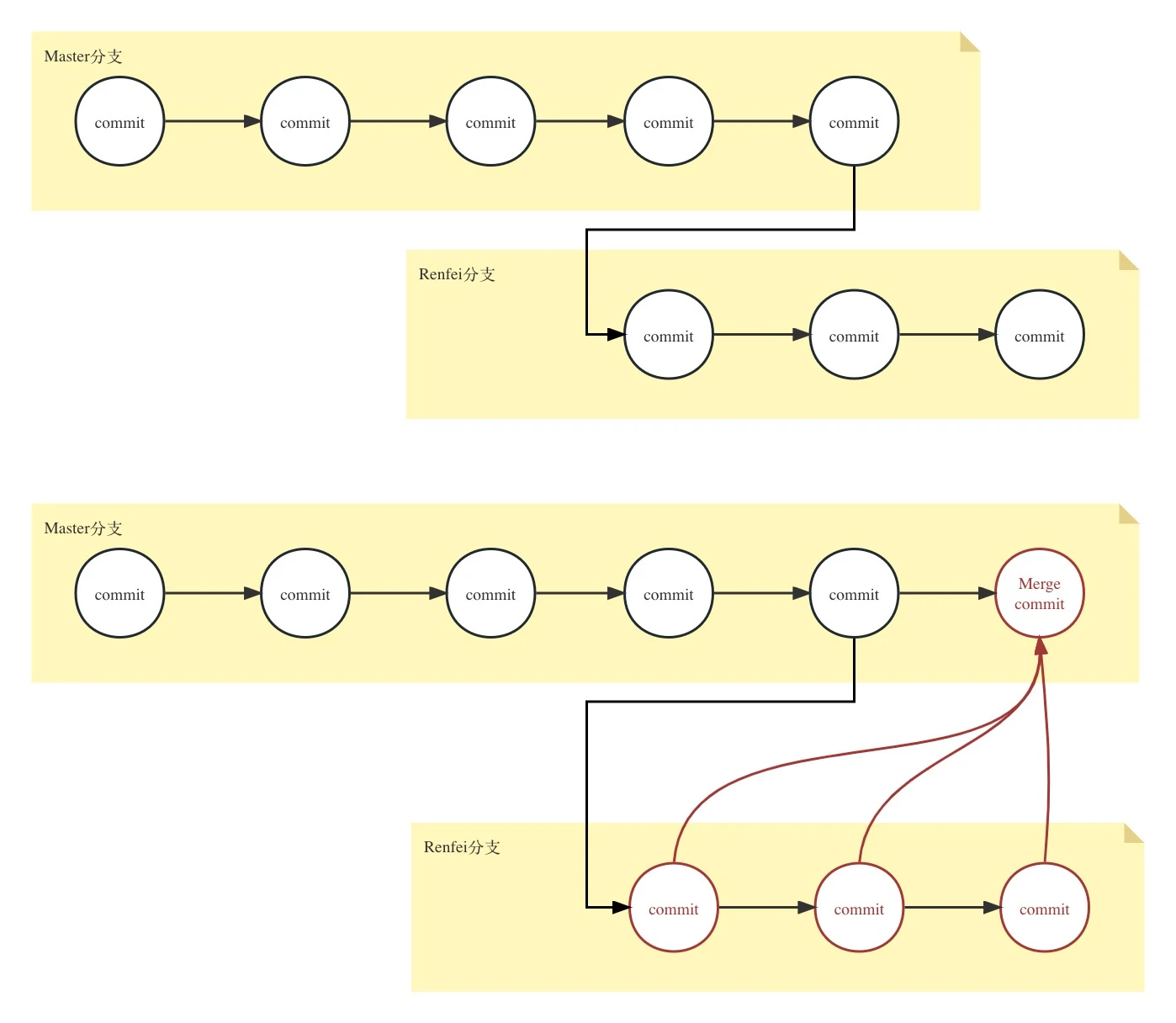
You might ask: why not just repoint pointers like rebase does? My take: master is the baseline branch — its code is trusted, safe, authoritative. My own dev branch is untrusted and unsafe. So every change of mine should land as a commit; if something goes wrong, you can roll back that commit quickly and restore the code.
When to use Merge vs Rebase
To summarize: pulling code from the authoritative branch into your own (or any untrusted) branch — use Git Rebase. Contributing code into the authoritative branch — use Git Merge.
About MRs (Merge Requests)
Some teams require an MR (Merge Request) to merge into the authoritative branch, instead of merging yourself and pushing — the protected branch blocks direct pushes. Other teams have no such rule. If the team is small and works well together, you can skip MRs — technically against policy, but everyone’s busy and nobody has time to review your code anyway.
That said, I think MRs have one great feature: blame distribution. If your diff is huge and you’re nervous, open an MR, then call in your teammates or your lead to review it — and let them press the Merge button. Mmm~~ if something breaks, everyone shares the blame.
Wrap-up
Here’s my personal habit — never had an accident with it: commit as much as you like, but before you push, pull first and rebase, then push.
Commit message convention
Recommended, not enforced. A commit message consists of Header + Body + Footer; the Header is the essential part, the other two optional. The Header is made of type, scope and subject; scope is optional — the affected area. The main types:
- feat: new feature
- fix: bug fix
- docs: docs only
- style: changes that don’t affect meaning (whitespace, formatting, missing semicolons, etc.)
- refactor: neither fixes a bug nor adds a feature
- perf: performance improvements
- test: adding missing tests or correcting existing ones
- build: changes to the build system or external dependencies (example scopes: gulp, broccoli, npm)
- ci: changes to CI config files and scripts (example scopes: Travis, Circle, BrowserStack, SauceLabs)
- chore: other changes that don’t modify src or test files
- revert: reverts a previous commit
The subject is the most important: a short description of this commit, no more than 50 characters, no trailing period.
A standard example: build(deps): update xxx maven version — this commit affects dependencies in the build, upgrading the maven version of xxx.