

This article satisfied my curiosity, and I really like both this kind of content and the author’s humorous style, so I’m reposting it for everyone to read. Original author: Li Zhennan, R&D engineer at JH GitLab.
Brave one, ever wondered how Git and JH GitLab work? Now grab your favorite IDE and set off on an exploration with us!
The Basics
Before we set off, we need three minutes of background. Timer starts now!
Inside a Git Repository
Every project using Git has a hidden .git folder at its root, which carries everything Git saves. Here are the parts we care about this time:
.git
├── HEAD # the branch (ref) the working space is currently on
├── objects # git objects; from these git can rebuild every commit and every file as it was
│   ├── 20 # loose objects, sharded by the first byte of the hash so no single directory has too many files
│   │   └── 7151a78fb5e2d99f1185db7ebbd7d883ebde6c
│   ├── 43 # another set of loose objects
│   │   └── 49b682aeaf8dc281c7a7c8d8460f443835c0c2
│   └── pack # compressed objects
└── refs # branches; the file content is a commit hash
    ├── heads
    │   ├── feat
    │   │   └── hello-world # some feature branch
    │   └── main # main branch
    ├── remotes
    │   └── origin
    │       └── HEAD # locally recorded remote branch
    └── tags # tags; the file content is a commit hash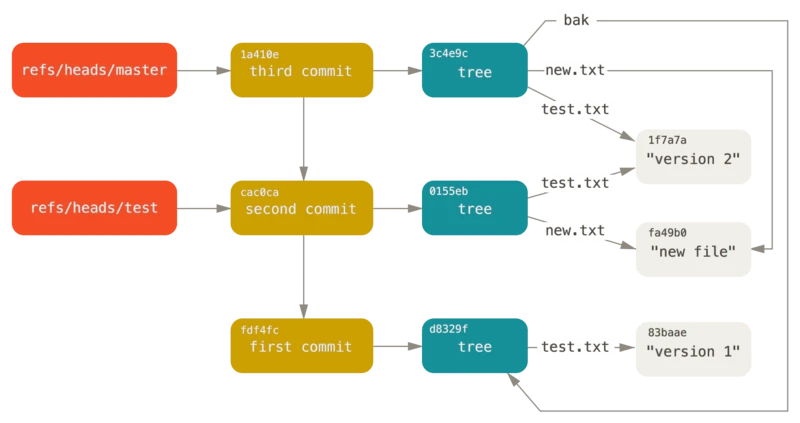
The red parts come from refs; everything else comes from objects. A commit object (yellow) points at a tree object (blue) holding the file structure, which in turn points at individual file objects (gray).
The Git server stores only what’s in the .git folder (known as a bare repository). git clone pulls that information down from the remote and rebuilds the repository at HEAD, while git push sends your local ref along with its commit objects, tree objects, and file objects to the remote. When Git transfers objects over the network it compresses them; compressed objects are called packfiles.
The Git Transport Protocol
Let’s walk through what happens during git push in time order:
- The user runs
git pushon the client - The client Git’s
git-send-packservice, carrying the repository identifier, calls the server’sgit-receive-packservice - The server returns the commit hash each ref currently points at, each hash written as 40 hex characters. They look like this:
001f# service=git-receive-pack000000c229859bcc73cdab4db2b70ed681077a5885f80134 refs/heads/main\x00report-status report-status-v2 delete-refs side-band-64k quiet atomic ofs-delta push-options object-format=sha1 agent=git/2.37.1.gl1
0000We can see the server’s main branch sits at 229859bcc73cdab4db2b70ed681077a5885f80134 (ignoring the preceding protocol content).
- Based on the refs returned, the client figures out which commits it has that the server doesn’t, and tells the server which refs are about to change:
009f0000000000000000000000000000000000000000 8fa91ae7af0341e6524d1bc2ea067c99dff65f1c refs/heads/feat/hello-worldIn this example we’re pushing a new branch feat/hello-world, currently pointing at 8fa91ae7af0341e6524d1bc2ea067c99dff65f1c. Since it’s a new branch, its previous value is recorded as 0000000000000000000000000000000000000000.
- The client packs the relevant commits along with their tree and file objects into a packfile and sends it to the server. Packfiles are binary:
report-status side-band-64k agent=git/2.20.10000PACK\x00\x00\x00\x02\x00\x00\x00\x03\x98\x0cx\x9c\x8d\x8bI\xc30\x0c\x00\xef~\x85\xee\x85"[^$(\xa5_\x91m\x85\xe6\xe0\xa4\x04\xe7\xff]^\xd0\xcb0\x87\x99y\x98A\x11\xa5\xd8\xab,\xbdSA]Z\x15\xcb(\x94|4\xdf\x88\x02&\x94\xa0\xec^z\xd86!\x08'\xa9\xad\x15j]\xeb\xe7\x0c\xb5\xa0\xf5\xcc\x1eK\xd1\xc4\x9c\x16FO\xd1\xe99\x9f\xfb\x01\x9bn\xe3\x8c\x01n\xeb\xe3\xa7\xd7aw\xf09\x07\xf4\\\x88\xe1\x82\x8c\xe8\xda>\xc6:\xa7\xfd\xdb\xbb\xf3\xd5u\x1a|\xe1\xde\xac\xe29o\xa9\x04x\x9c340031Q\x08rut\xf1u\xd5\xcbMap\xf6\xdc\xd6\xb4n}\xef\xa1\xc6\xe3\xcbO\xdcp\xe3w\xb10=p\xc8\x10\xa2(%\xb1$U\xaf\xa4\xa2\x84\xa1T\xe5\x8eO\xe9\xcf\xd3\x0c\\R\x7f\xcf\xed\xdb\xb9]n\xd1\xea3\xa2\x00\xd3\x86\x1db\xbb\x02x\x9c\x01+\x00\xd4\xff2022\xe5\xb9\xb4 09\xe6\x9c\x88 01\xe6\x97\xa5 \xe6\x98\x9f\xe6\x9c\x9f\xe5\x9b\x9b 15:52:13 CST
\xa4d\x11\xa1\xe8\x86\xdeQ\x90\xb1\xe0Z\xfd\x7f\x91\x90\xc3\xd6\x17\xe8\x02&K\xd0- The server unpacks the packfile, updates refs, and returns the result:
003a\x01000eunpack ok0023ok refs/heads/feat/hello-worldThe Git transport protocol can ride on either SSH or HTTP(S). Pretty straightforward, right?
What JH GitLab Is Made Of
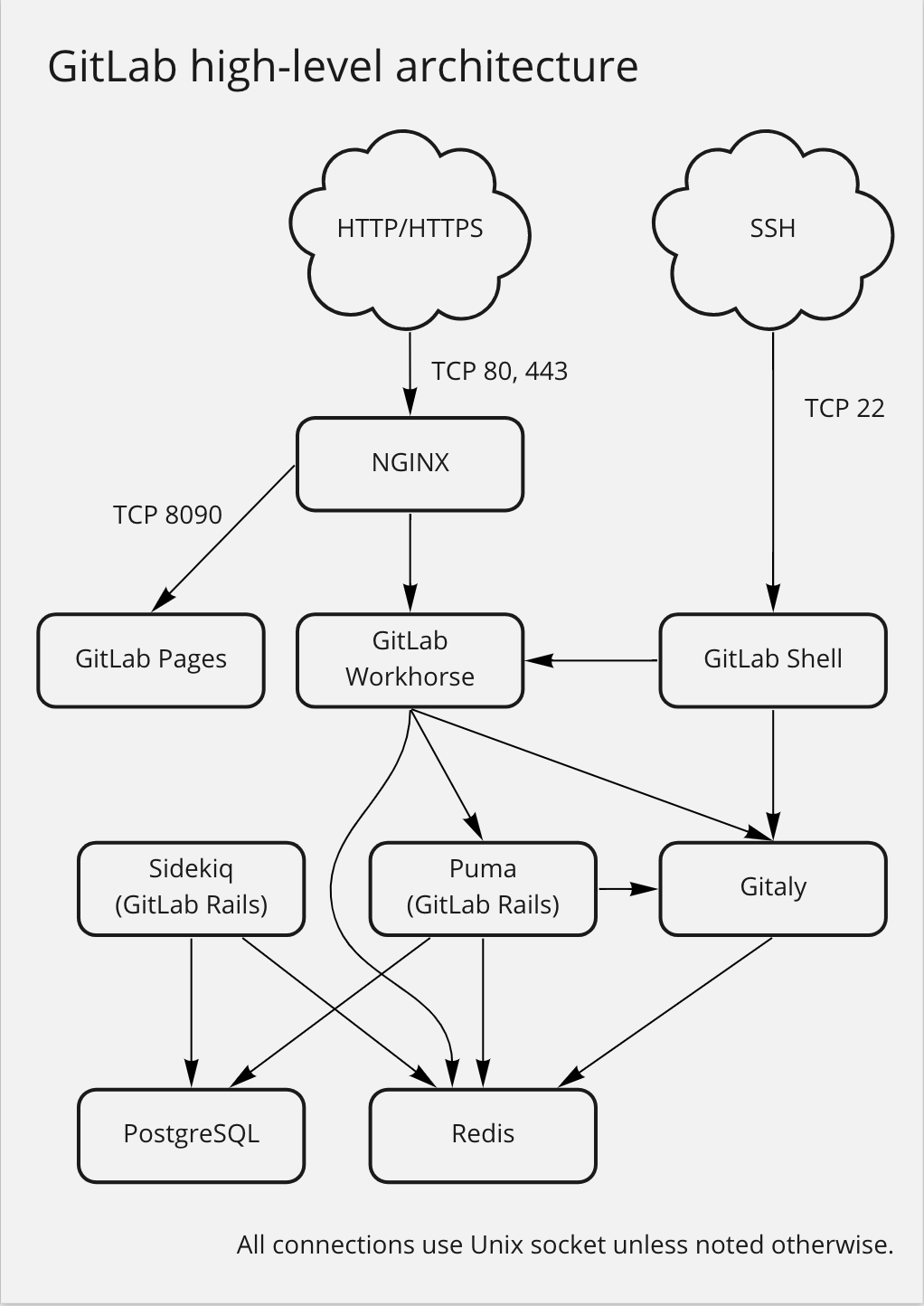
JH GitLab is a widely used Git hosting service that also supports collaborative development, task tracking, CI/CD, and more. It isn’t a monolith. Taking major version 15 as an example, these are the components involved in git push:
- JH GitLab — developed in Ruby, split into two parts: the JH GitLab web/API service (called Rails below) and the task queue/background jobs (called Sidekiq below).
- Gitaly — developed in Go; JH GitLab’s Git backend. It owns Git repository storage and reads/writes, exposing Git operations as gRPC calls. Early on, Rails ran Git commands directly against repositories on NFS, and once the scale grew the network IO latency was something else — hence Gitaly was split out.
- Workhorse — developed in Go; a reverse proxy in front of Rails that handles “slow” HTTP requests like Git push/pull and file upload/download. Rails used to handle these, and they hogged considerable CPU and memory for long stretches. To keep the service stable, JH GitLab had to set the
git clonetimeout to one minute — which then broke availability for large repositories that couldn’t clone in time. Goroutines are far cheaper, so they were put to work on exactly this class of request. - JH GitLab Shell — developed in Go; handles authentication of Git SSH connections and passes data between the user’s Git client and Gitaly.
- JH GitLab Runner — developed in Go; executes CI/CD work.
JH GitLab stores data in Postgres and uses Redis for caching. Rails and Sidekiq connect to the database and cache directly; the other components read and write data through APIs Rails exposes.
Let’s git push!
Three minutes flew by! You’ve got the fundamentals now — let’s set out!
Prefer SSH?
If your remote looks like git@jihulab.example.com:user/repo.git, you’re talking to JH GitLab over SSH. When you run git push, essentially your Git client’s upload-pack service runs this command:
ssh -x git@jihulab.example.com "git-receive-pack 'user/repo.git'"There’s plenty worth unpacking here:
- Every user’s username is
git— how does the server tell them apart? (How can it distinguish me, male or female?) - SSH? Can I run arbitrary commands on the server?
Both problems are solved by JH GitLab Shell’s gitlab-sshd. It’s a customized SSH daemon speaking the same SSH protocol as regular sshd, so clients can’t tell them apart. During the SSH handshake the client offers its public key; gitlab-sshd calls Rails’ internal API GET /api/v4/internal/authorized_keys to check whether the key is registered with JH GitLab and get back the key ID (which maps to a user), while verifying that the handshake signature was produced by the private key matching that public key. On top of that, gitlab-sshd restricts which commands a client may run — it actually uses the command the user ran to decide which method it should execute, and any command without a matching method is rejected. Sadly, it looks like we can’t run bash or rm -rf / over SSH on JH GitLab’s servers. ┑( ̄Д  ̄)┍
Fun fact: early JH GitLab really did use sshd to answer Git requests. To solve the two problems above they wrote authorized_keys like this:
# Managed by gitlab-rails
command="/bin/gitlab-shell key-1",no-port-forwarding,no-X11-forwarding,no-agent-forwarding,no-pty ssh-
rsa AAAAB3NzaC1yc2EAAAABJQAAAIEAiPWx6WM4lhHNedGfBpPJNPpZ7yKu+dnn1SJejgt1016k6YjzGGphH2TUxwKzxcKDKKezwkpfnxPkSMkuEspGRt/aZZ9wa++Oi7
Qkr8prgHc4soW6NUlfDzpvZK2H5E7eQaSeP3SAwGmQKUFHCddNaP0L+hM7zhFNzjFvpaMgJw0=
command="/bin/gitlab-shell key-2",no-port-forwarding,no-X11-forwarding,no-agent-forwarding,no-pty ssh-
rsa AAAAB3NzaC1yc2EAAAABJQAAAIEAiPWx6WM4lhHNedGfBpPJNPpZ7yKu+dnn1SJejgt1026k6YjzGGphH2TUxwKzxcKDKKezwkpfnxPkSMkuEspGRt/aZZ9wa++Oi7
Qkr8prgHc4soW6NUlfDzpvZK2H5E7eQaSeP3SAwGmQKUFHCddNaP0L+hM7zhFNzjFvpaMgJw0=
Yes, you guessed it: every JH GitLab user’s public key went into that one file, and it could reach hundreds of megabytes. Sublime in its crudeness. The command parameter overrode whatever the SSH client wanted to run, making sshd launch gitlab-shell with the key ID as its argument. gitlab-shell could read the client’s original command from the SSH_ORIGINAL_COMMAND environment variable set by sshd, then run the relevant method.
Since sshd matches authorized_keys with a linear scan, once that file grows huge, earlier-registered users (whose keys sit at the top) get a much higher match priority than later ones. In other words, SSH auth was noticeably faster for older users. (A genuine old-timer perk.)
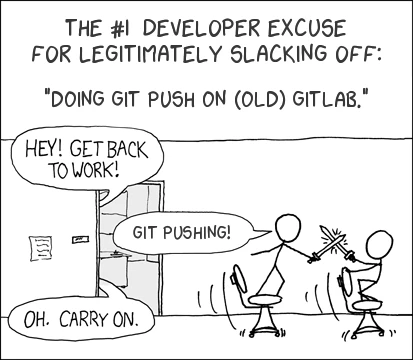
Today gitlab-sshd sits on top of a Rails API backed by Postgres indexes, and this bug (feature?) is gone.
Once the user is authenticated, gitlab-sshd checks whether they have write access to the target repository (POST /api/v4/internal/allowed), and learns which Gitaly instance hosts the repository, plus the user ID and repo info. Finally, gitlab-sshd calls that Gitaly instance’s SSHReceivePack method, acting as relay and translator between the Git client (SSH) and Gitaly (gRPC).
Those last two steps are the same for gitlab-shell and gitlab-sshd. From a macroscopic view, git push over SSH looks like this:
- The user runs
git push - The Git client connects to gitlab-shell over SSH
- gitlab-shell calls
GET /api/v4/internal/authorized_keyswith the client’s public key to get the key ID, and completes the SSH handshake - gitlab-shell calls
POST /api/v4/internal/allowedwith the key ID and repo path to confirm the user has write access to the repo - The API returns: the Gitaly address and auth token, the repo object, and hook callback info (logical username
GL_ID, logical project nameGL_REPOSITORY) - gitlab-shell calls Gitaly’s
SSHReceivePackwith the above, becoming the relay between client and Gitaly - Gitaly runs
git-receive-packin the appropriate working directory, pre-setting theGITALY_HOOKS_PAYLOADenvironment variable containingGL_ID,GL_REPOSITORY, and so on - Server-side Git tries to update refs and runs Git hooks
- Done
We’ll get to Gitaly and ref updates shortly.
Prefer HTTP(S)?
An HTTP(S) remote looks like https://gitlab.example.com/user/repo.git. Unlike SSH, HTTP requests are stateless and always request-then-response. During git push, the Git client talks to two endpoints in order:
-
GET https://gitlab.example.com/user/repo.git/info/refs?service=git-receive-pack— the server returns, in the body, the commit hash each branch currently points at. -
POST https://gitlab.example.com/user/repo.git/git-receive-pack— the client submits, in the body, the branch to update along with its old and new commit hashes, plus any required packfile. The server returns the processing result in the body, including our old friend, the “to create a merge request” hint:003a\x01000eunpack ok 0023ok refs/heads/feat/hello-world 00000085\x02 To create a merge request for feat/hello-world, visit: https://gitlab.example.com/user/repo/-/merge_requests/new?merge_request%5Bs0029\x02ource_branch%5D=feat%2Fhello-world 0000
Both requests are intercepted by Workhorse, which does these two things every time:
- Forwards the request verbatim to Rails, which returns the auth result, user ID, and the Gitaly instance info for the repo (a bit odd, right? Rails’
info/refsandgit-receive-packendpoints are apparently used for authentication — I suspect there’s some history behind that) - Using what Rails returned, Workhorse establishes a connection to Gitaly and acts as relay between client and Gitaly.
To sum up, git push over HTTP(S) goes like this:
- The user runs
git push - The Git client calls
GET https://gitlab.example.com/user/repo.git/info/refs?service=git-receive-packwith the appropriate authorization header - Workhorse intercepts it, forwards it verbatim to Rails, and gets the auth result, user ID, and Gitaly instance info for the repo
- Using that, Workhorse calls Gitaly’s gRPC service
InfoRefsReceivePack, relaying between client and Gitaly - Gitaly runs
git-receive-packin the appropriate working directory and returns ref info - The Git client calls
POST https://gitlab.example.com/user/repo.git/git-receive-pack - Workhorse intercepts it, forwards it verbatim to Rails, and gets the auth result, user ID, and Gitaly instance info for the repo
- Using that, Workhorse calls Gitaly’s gRPC service
PostReceivePack, relaying between client and Gitaly - Gitaly runs
git-receive-packin the appropriate working directory, pre-settingGITALY_HOOKS_PAYLOADwithGL_ID,GL_REPOSITORY, and so on - Server-side Git tries to update refs and runs Git hooks
- Done
Gitaly and Git Hooks
Phew. With the connection layer and permission checks behind us, we can finally approach JH GitLab’s Git core: Gitaly.

The name Gitaly is an in-joke: a nod to Git and to the Russian town of Aly, whose resident population came out to 0 in Russia’s 2010 census. Gitaly’s engineers hope most of Gitaly’s operations involve zero disk IO too. Software engineers’ jokes are incredibly dry — most people can’t swallow them.
Gitaly owns JH GitLab’s repository storage and operations. It runs the local Git binary via fork/exec, using cgroups to stop a single Git process from eating too much CPU and memory. Repositories are stored locally at paths like /var/opt/gitlab/git-data/repositories/@hashed/b1/7e/b17ef6d19c7a5b1ee83b907c595526dcb1eb06db8227d650d5dda0a9f4ce8cd9.git. Early JH GitLab/Gitaly also used #{namespace}/#{project_name}.git, but both namespace and project_name are user-modifiable, which added extra runtime overhead.
git push maps to Gitaly’s SSHReceivePack (SSH) and PostReceivePack (HTTPS) methods, both of which bottom out in Git’s git-receive-pack — meaning the core ref and object updates are done by the Git binary itself. git-receive-pack provides hooks that let Gitaly intervene, which drags Rails in as well. A one-way request flow (without responses) looks roughly like this:
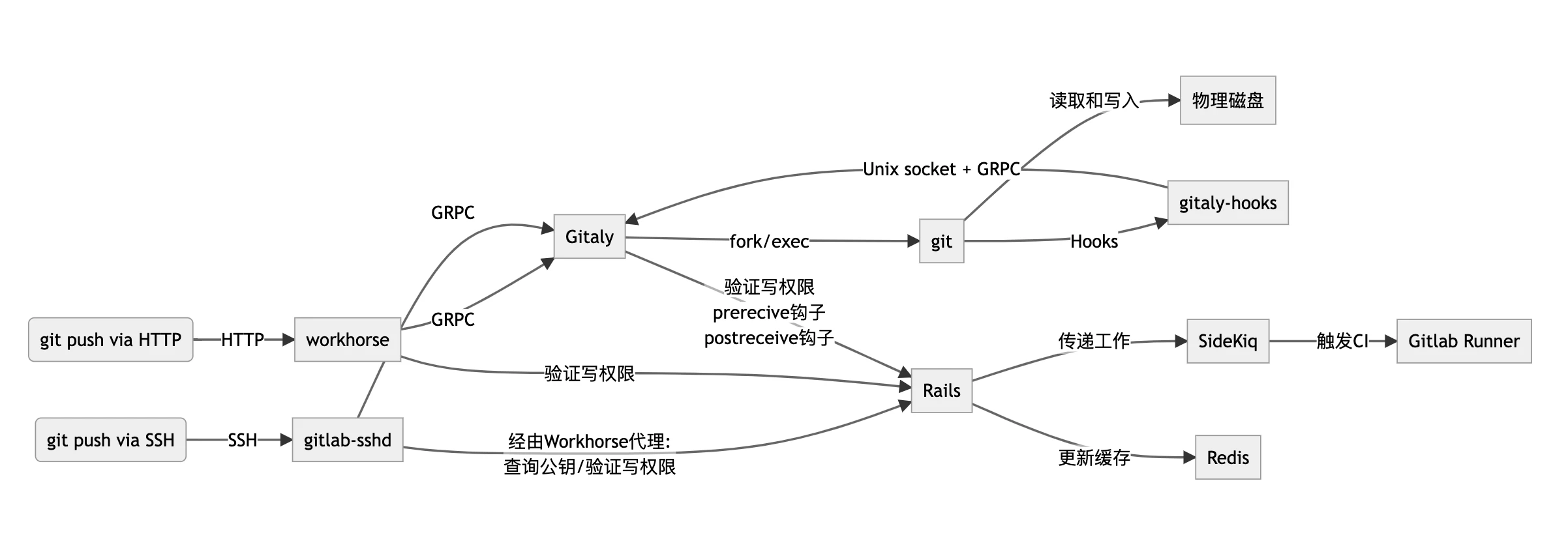
When Gitaly starts git-receive-pack it passes a Base64-encoded JSON through the GITALY_HOOKS_PAYLOAD environment variable, containing repo info, Gitaly’s Unix socket address and connection token, user info, and which hooks to run (for git push, always these few), and sets Git’s core.hooksPath to a temporary folder Gitaly prepared at startup, where every hook file is symlinked to gitaly-hooks. Once launched by git-receive-pack, gitaly-hooks reads GITALY_HOOKS_PAYLOAD from the environment, connects back to Gitaly over the Unix socket and gRPC, and tells Gitaly which hook is running along with the arguments Git passed to it.
pre-receive hook
This hook fires once when Git receives a git push. When invoking gitlab-hooks, Git writes the change info to its standard input — “some ref wants to move from commit hash A to commit hash B”, one per line:
<old commit ref hash> SP <new commit ref hash> SP <ref name> LFWhere SP is a space and LF is a newline. Once that info reaches Gitaly, Gitaly calls two Rails endpoints in turn:
POST /api/v4/internal/allowed— already called during connection-layer auth; this time it carries the change info too, letting Rails make finer-grained judgments, such as blocking force pushes or checking whether the branch is protected.POST /api/v4/internal/pre_receive— notifies Rails that this repository is about to receive a write, bumping the repo’s reference count by 1, which prevents Git writes from being interrupted by major changes elsewhere.
If POST /api/v4/internal/allowed returns an error, Gitaly passes it back to gitaly-hooks, which writes the error to standard error and exits with a non-zero code. git-receive-pack collects the error and writes it to standard error; the non-zero exit from gitaly-hooks makes git-receive-pack abort the current push with a non-zero code too, returning control to Gitaly, which collects git-receive-pack’s standard error and replies with a gRPC response to Workhorse/Gitlab-Shell.
Careful readers may ask: when hooks run, the relevant objects have certainly been uploaded already, so if we stop here, how are those dangling objects handled? Objects from an unfinished push are in fact written into a quarantine environment first, stored separately in a subdirectory under objects, something like incoming-8G4u9v. That way, if the hooks decide the push is bad, the related resources can be cleaned up easily.
update hook
This hook fires just before Git actually updates a ref, once per ref, taking its arguments from the command line: the ref to update, the old commit hash, and the new commit hash. Currently this hook doesn’t interact with Rails.
JH GitLab also supports custom Git hooks: pre-receive, update, and post-receive are all supported, executed inside Gitaly when gitaly-hooks notifies Gitaly that a hook is running. This is the moment a custom update hook fires.

The hook in this picture has a long historical connection to computer science… ahem, fine, I can’t keep that up. I was just worried you’d fall asleep by now, so here’s a picture to relax you.
post-receive hook
Once all refs are updated, Git runs the post-receive hook once, with the same arguments as pre-receive. After hearing from gitaly-hooks, Gitaly calls Rails’ POST /api/v4/internal/post_receive, and Rails does a great deal there:
- Returns the prompt telling the user to create a Merge Request
- Decrements the repo reference count incremented during pre-receive
- Refreshes repo caches
- Triggers CI
- Sends email, if applicable
Some of those are asynchronous and handed off to Sidekiq.
In Closing
Now you’ve walked the full git push path from client to server. What a journey!
Brave one, the picture below is the treasure you earned for clearing it.