Tutorial index: Big Data for Beginners: tutorial series
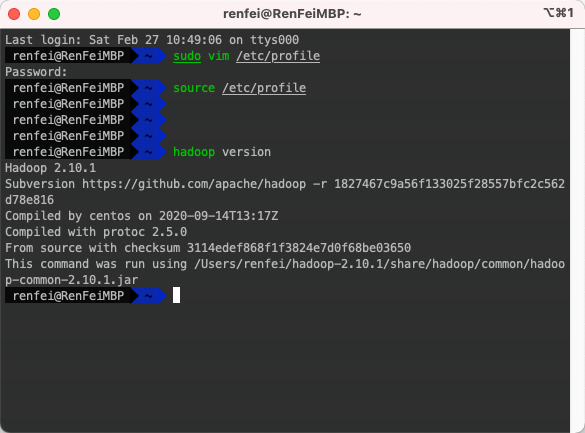
Last post covered HDFS broadly. From this section on we’ll drive Hadoop by writing code, so first we need a local Hadoop development environment. If you followed the earlier posts and got Hadoop running in a VM, setting it up locally is a walk in the park. If you haven’t — or haven’t read those posts — read them first.
Recommended Prerequisite Reading
I suggest reading the earlier setup material first. Local setup is simpler than cluster setup: it’s mostly environment variables and config files.
- Hadoop for Beginners (2): Installing Hadoop
- Hadoop for Beginners (4): A Fully Distributed Hadoop Cluster
Java Environment
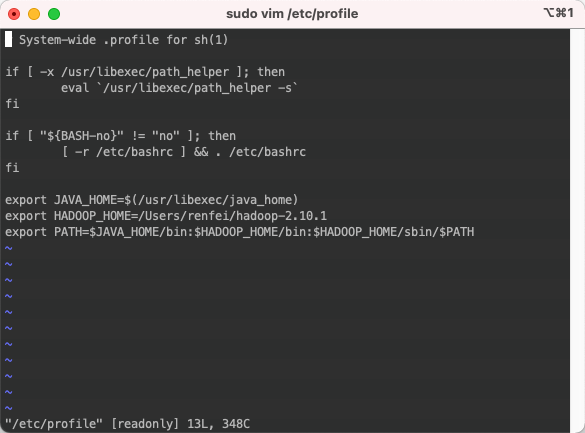
First configure Java, meaning the JAVA_HOME environment variable. There are plenty of tutorials online so I won’t belabor it — here’s how I set it up on macOS.
On macOS, JAVA_HOME should be /usr/libexec/java_home, which may differ from Windows since macOS ships with its own Java installation.
Hadoop Environment
As in the earlier tutorials: download Hadoop and set the HADOOP_HOME environment variable, then configure the files under etc/hadoop to match the cluster we built. I also edited /etc/hosts locally so those hostnames resolve to the machines in my cluster.