

Tutorial index: Big Data for Beginners: tutorial series
HDFS stands for Hadoop Distributed File System. It is a highly fault-tolerant system designed for deployment on cheap commodity machines. It delivers high-throughput data access, which makes it a great fit for applications over very large data sets.
HDFS Characteristics
Everything has strengths and weaknesses — nothing in the world is perfect. Big data folks use Hadoop not because it’s flawless, but because nobody has come up with a better solution yet.
Strengths
HDFS was designed with redundancy built in, so data is very safe and highly fault-tolerant: even losing a node entirely doesn’t endanger the data, since data is spread across multiple nodes with multiple copies stored. That lets us keep precious data on cheap hardware.
The distributed design also gives the cluster enormous storage capacity — GB, TB, PB, even EB.
Weaknesses
The strengths bring the weaknesses. Because files are spread across many nodes, retrieving them suffers real latency, unlike reading from a single disk which happens in milliseconds.
And since HDFS stores data distributed, it relies on the NameNode to record where every file lives — so it’s poorly suited to storing huge numbers of tiny files, which puts enormous pressure on the NameNode.
It also doesn’t support concurrent writes or random modification: unlike a disk, you can’t modify data whenever you like. You can only append to files, or write once and read thereafter.
HDFS Components
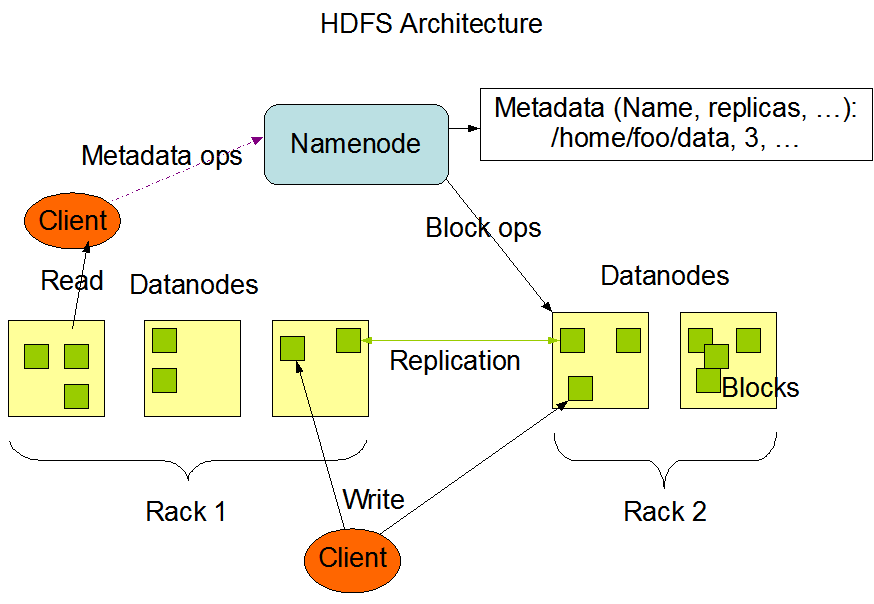
Here’s a structure diagram from the official Hadoop documentation; it mainly describes three parts.
NameNode
The NameNode is the master. It manages HDFS, the replication strategy, block mapping information, and handles read/write requests from clients.
DataNode
The DataNode is the slave. It stores the actual blocks and reads/writes data.
Client
The client splits data into blocks before uploading, talks to the NameNode for block locations, and reads/writes data against the DataNodes. Commands to the NameNode are issued through the client.
HDFS Blocks
The biggest difference between HDFS and an everyday disk is the block: HDFS doesn’t store whole files one by one, it stores blocks one by one, scattering them across different cluster nodes. When you want a file back, it gathers the blocks from those nodes and reassembles your original file.
Block size is configurable, but the default is 128 MB in Hadoop 2.x and 64 MB in Hadoop 1.x.
Why 128 MB?
Let’s look at what reading a file actually involves:
- Ask the NameNode where the parts of your file are — that’s addressing.
- Read the blocks from the corresponding DataNodes — that’s the actual data transfer.
If blocks are tiny, you generate a huge number of them and step 1 eats a lot of time. If blocks are huge, there are fewer of them and addressing gets fast, but step 2 may drag, because disk I/O throughput is finite.
Mechanical drives on the market today read at roughly 100 MB/s, so a 128 MB block works out to about one block per second, while addressing takes about 10 ms — a reasonable pairing. If your disks are faster you can raise the block size, and lower it if they’re slower. The default is fine for most purposes.
HDFS Shell Commands
I won’t go deep on HDFS shell commands, because anything I said would be copied from the official docs — better to read them directly: https://hadoop.apache.org/docs/r2.10.1/hadoop-project-dist/hadoop-hdfs/HDFSCommands.html
I’ll just cover a few common ones to get you started; the rest you can read up on yourself. HDFS operations are very similar to Linux ones, so you’ll pick it up fast. Some examples:
bin/hadoop fs <command>
Show directory contents: hadoop fs -ls /
Create a directory: hadoop fs -mkdir -p /renfei/test
Show file contents: hadoop fs -cat /renfei/test/hadoop.txt
See — exactly like Linux? So I’ll stop there and point you at the official docs. Next post we’ll operate HDFS from code.