
Tutorial index: Big Data for Beginners: tutorial series
Last post covered the role of a data warehouse. As data flows into our warehouse over time, both the variety and volume grow. Without governance and design, querying and retrieving that data becomes very painful — so the warehouse needs designing, with each type of data filed where it belongs, ready to be called up whenever we need it.
RenFei’s note: most of the layered warehouse design described here comes from Alibaba’s The Road to Big Data. You won’t find DWD/DWS and similar terminology in English-language literature, and this layering is only a recommendation with no single right answer — it may not suit your industry’s data structures. Still, the thinking is useful for building your own industry’s data structures and models.
Why Layer It?
If we don’t govern raw data, once volume reaches massive scale you’ll find that building a single analysis chart is exhausting: you may need to join hundreds of tables and scan several terabytes. So we trade space for time — build multi-level data models for users to consume, keep them away from operating directly on raw data, and give them far more efficient access. It also breaks a complex problem into individual simple steps that are easier to understand.
Warehouse Layers
Note there’s no standard answer for layering. I’m presenting Alibaba’s solution; most designs use four layers, and while names and acronyms vary, grasp the idea rather than fixating on which exact layers there must be.
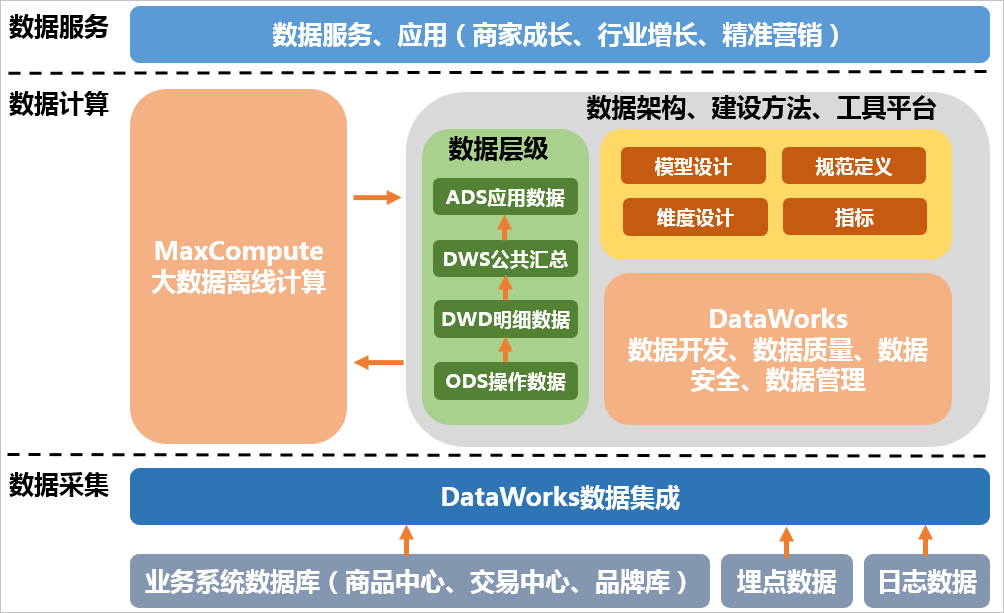
Per Alibaba’s big data computing service (MaxCompute, formerly ODPS) and the solution in The Road to Big Data, the warehouse splits into four layers: Operational Data Store (ODS), Data Warehouse Detail (DWD), Data Warehouse Summary (DWS), and Application Data Store (ADS). Here’s Alibaba Cloud’s description of MaxCompute:
Operational Data Store (ODS)
ODS is sometimes called the source-adjacent layer, because it holds the rawest data: we change nothing, preserving the original content and keeping the structure identical to the source system. It’s the warehouse’s data staging area.
Data extracted from source systems lands here and enters our big data platform from this area. In this zone we only query — never modify or delete any data.
Data Warehouse Detail (DWD)
DWD keeps the same data structure as ODS; the transfer from ODS into DWD is what’s called ETL, which we’ll cover later. During extraction the data is cleaned and processed, providing some data-quality assurance and cleaner data.
It also performs dimension degradation: when a dimension carries no data the warehouse needs, you degrade it by folding it into the fact table, reducing joins between fact and dimension tables. We’ll get to fact and dimension tables later — here we’re only talking about layering.
Data Warehouse Summary (DWS)
This layer does light aggregation and is also called the wide-table layer; some places call it Data Warehouse Service (DWS). Don’t get hung up on the naming or what the acronym stands for — grasp the governance idea.
The number of tables drops sharply here, mostly organized by subject such as orders or users, but each table has many columns, hence “wide table”. Since DWD above performed dimension degradation, some redundancy can appear here — for instance an order ID may exist in several fact tables, which is normal and serves downstream business queries.
Here’s how Alibaba describes this layer; it’s a bit of a mouthful:
Driven by the subject being analyzed, and based on the metric requirements of upper-layer applications and products, build common-granularity summary metric fact tables and materialize the model through wide-table techniques. Establish well-named, consistently defined statistical metrics to supply common indicators to upper layers, building summary wide tables and detailed fact tables.
Application Data Store (ADS)
Some call this the Data Mart (DM) layer. As the name suggests, the data here is consumed by top-layer applications — for instance aggregating into report data on a subject area to feed various statistical reports.