
This post shares my personal high-concurrency Nginx configuration on a 2-core 2 GB Ubuntu box. Other Linux systems may differ — take it as reference only.
The numbers
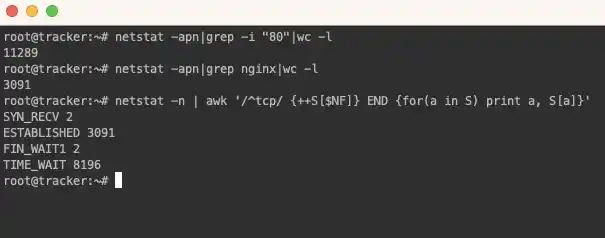
Mine is a personal 2-core 2 GB machine with a small disk. The request volume is so large that I stopped looking at access.log, so I can’t compute QPS/TPS properly, and since it’s serving live traffic I never ran a load test — I don’t know where the ceiling is. All I can give is the current state while serving normally:
- Requests: ~1,368 per second on average; 80,000/min; 4.92 million/hour; 100 million/day; 3.4 billion/month
- Concurrency: around 3,000 (
netstat -apn|grep nginx|wc -l) - CPU: 50%–60%
- HTTPS: off — with SSL enabled the CPU would max out
Why 1,300 requests/second but 3,000 concurrent connections? Because there’s a business service behind Nginx. The backend takes time; if it can’t chew through 1,300 requests per second, Nginx has to hold connections waiting for responses — so concurrency exceeds per-second request count.

Environment
- Hardware: shared cloud host, 2-core AMD EPYC, 2 GB RAM, 4 GB SWAP
- OS: Ubuntu 22.04.3 LTS
- Software: Nginx 1.18.0
- SSL: off; HTTPS terminates at the CDN, origin pulls use plain HTTP
OS-level configuration
On Linux everything is a file, including TCP connections, so the OS limits must be raised first — Linux caps the maximum open files per process.
Open file limits
Edit /etc/security/limits.conf — one line per user config — and add:
www-data soft nofile 1048576
www-data hard nofile 1048576
I run nginx as www-data; adjust to your setup. This sets both the soft and hard limits.
Edit /etc/systemd/system.conf — modify or add DefaultLimitNOFILE:
DefaultLimitNOFILE=65535:524288Edit /etc/sysctl.conf and add fs.file-max:
fs.file-max = 1048576
vm.max_map_count = 1048576
Edit /etc/default/nginx and add ULIMIT:
ULIMIT="-n 1048576"Set the content of /proc/sys/vm/max_map_count to 1048576 — this adjusts the connection tracking module’s maximum. Run directly:
echo 1048576 > /proc/sys/vm/max_map_countNginx configuration
Edit the nginx config (mine is /etc/nginx/nginx.conf). Main changes:
worker_processes 2;— match your CPU thread countworker_rlimit_nofile 65535;— max open filesworker_connections 65535;in events — clients served per workermulti_accept on;in events — let each worker accept multiple connectionsuse epoll;in events — the preferred method on newer Linux kernels
Combined:
user www-data;
worker_processes 1;
worker_rlimit_nofile 65535;
events {
use epoll;
worker_connections 65535;
multi_accept on;
}
The http block settings depend on your actual backend — header sizes, body sizes and so on — so I won’t show them.
Verifying the configuration
Kernel parameter changes may require a reboot — recommended. If you can’t reboot, run:
sysctl -pRun ulimit -n to see the current open-files limit. Then find the nginx PID with ps (mine was 601) and print its limits:
cat /proc/601/limitsCheck whether Max open files has actually changed.