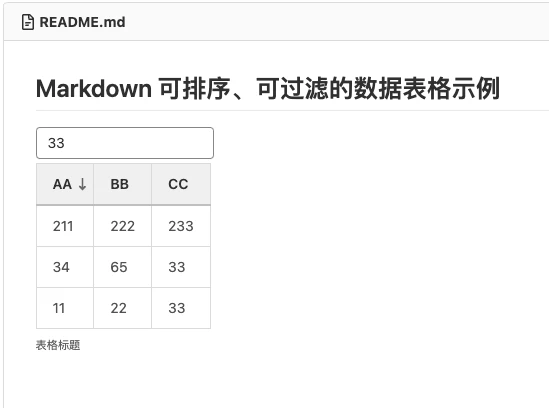
Writing tables in Markdown is a pain every time — boilerplate everywhere, all those |--| symbols, hard to read, and the tables are static.
JH GitLab 15.3 added a new feature: JSON-based tables that support filtering and sorting, making your tables dynamic and several times more useful!
Using JSON TABLE
If you’re a frontend developer you’ll get this instantly — plenty of frontend components define tables with JSON, and it means the same thing here.
First define a code block with the format json:table, like this:
```json:table
{}
```
Then fill in the header column array:
```json:table
{
    "fields" : [
        {"key": "a", "label": "AA"},
        {"key": "b", "label": "BB"},
        {"key": "c", "label": "CC"}
    ]
}
```
Now add the data array:
```json:table
{
    "fields" : [
        {"key": "a", "label": "AA"},
        {"key": "b", "label": "BB"},
        {"key": "c", "label": "CC"}
    ],
    "items" : [
      {"a": "11", "b": "22", "c": "33"},
      {"a": "34", "b": "65", "c": "33"},
      {"a": "56", "b": "32", "c": "54"},
      {"a": "211", "b": "222", "c": "233"}
    ]
}
```
To make a column sortable, add a sortable property to the column object:
```json:table
{
    "fields" : [
        {"key": "a", "label": "AA", "sortable": true},
        {"key": "b", "label": "BB", "sortable": true},
        {"key": "c", "label": "CC", "sortable": true}
    ],
    "items" : [
      {"a": "11", "b": "22", "c": "33"},
      {"a": "34", "b": "65", "c": "33"},
      {"a": "56", "b": "32", "c": "54"},
      {"a": "211", "b": "222", "c": "233"}
    ]
}
```
To add search filtering, add a filter property at the top level:
```json:table
{
    "fields" : [
        {"key": "a", "label": "AA", "sortable": true},
        {"key": "b", "label": "BB", "sortable": true},
        {"key": "c", "label": "CC", "sortable": true}
    ],
    "items" : [
      {"a": "11", "b": "22", "c": "33"},
      {"a": "34", "b": "65", "c": "33"},
      {"a": "56", "b": "32", "c": "54"},
      {"a": "211", "b": "222", "c": "233"}
    ],
    "filter": true
}
```
The table title is still the default, so let’s add a custom caption:
```json:table
{
    "caption" : "Table Title",
    "fields" : [
        {"key": "a", "label": "AA", "sortable": true},
        {"key": "b", "label": "BB", "sortable": true},
        {"key": "c", "label": "CC", "sortable": true}
    ],
    "items" : [
      {"a": "11", "b": "22", "c": "33"},
      {"a": "34", "b": "65", "c": "33"},
      {"a": "56", "b": "32", "c": "54"},
      {"a": "211", "b": "222", "c": "233"}
    ],
    "filter": true
}
```
At this point the table supports sorting and search filtering. Example repo: https://jihulab.com/renfei/markdown-jsontable-example