

Tutorial index: Big Data for Beginners: tutorial series
Last post gave us a general idea of what MapReduce is. In this one we’ll implement WordCount in code and get a feel for how MapReduce actually works. Complete source for this chapter: https://github.com/renfei/demo/blob/master/hadoop/hadoop_api/src/main/java/net/renfei/hadoop/WordCountMapReduce.java
The Mapper Class
Start with a Mapper class — I’ve called mine WordCountMapper:
/**
 * Map
 */
public static class WordCountMapper extends Mapper<LongWritable, Text, Text, IntWritable> {
    private final Text word = new Text();
    private final IntWritable intWritable = new IntWritable(1);
    /**
     * The Mapper's business logic goes in map(), which we override from the parent
     *
     * @param key
     * @param value
     * @param context
     * @throws IOException
     * @throws InterruptedException
     */
    @Override
    protected void map(LongWritable key, Text value, Context context) throws IOException, InterruptedException {
        // Read one line of data
        String line = value.toString();
        // Split words on spaces
        String[] words = line.split(" ");
        // Iterate the words
        for (String word : words
        ) {
            this.word.set(word);
            // Hand the mapped result back to the framework
            context.write(this.word, this.intWritable);
        }
    }
}
We extend org.apache.hadoop.mapreduce.Mapper, passing four types — <LongWritable, Text, Text, IntWritable> — standing for input key type, input value type, output key type, and output value type — then override map().
LongWritable, Text and IntWritable are Hadoop types: same idea as their Java counterparts with “Writable” appended. Text is really a String; think of them as wrapper types. We’ll cover those next chapter.
The map() method holds our main business logic.
The Reducer Class
Now a Reducer class — mine is WordCountReducer:
/**
 * Reduce
 */
public static class WordCountReducer extends Reducer<Text, IntWritable, Text, IntWritable> {
    private final IntWritable total = new IntWritable();
    @Override
    protected void reduce(Text key, Iterable<IntWritable> values, Context context) throws IOException, InterruptedException {
        int sum = 0;
        // Iterate the values for the same key produced by Map above
        for (IntWritable value : values
        ) {
            // Sum the values
            sum += value.get();
        }
        // Box it up
        this.total.set(sum);
        // Hand the reduced result back to the framework
        context.write(key, this.total);
    }
}
Same idea as the Mapper: extend org.apache.hadoop.mapreduce.Reducer, pass four types representing input key, input value, output key, and output value, then override reduce().
The reduce() method holds our main business logic.
The Driver Class
One more class to drive the Map and Reduce — I called it WordCountMapReduce — with a main entry point:
/**
 * Program entry point
 *
 * @param args
 * @throws IOException
 */
public static void main(String[] args) throws IOException, ClassNotFoundException, InterruptedException {
    Job job = Job.getInstance(new Configuration());
    // Tell the framework our classpath
    job.setJarByClass(WordCountMapReduce.class);
    // Tell the framework about the mapper and reducer
    job.setMapperClass(WordCountMapper.class);
    job.setReducerClass(WordCountReducer.class);
    // Tell the framework their output types
    job.setMapOutputKeyClass(Text.class);
    job.setMapOutputValueClass(IntWritable.class);
    job.setOutputKeyClass(Text.class);
    job.setOutputValueClass(IntWritable.class);
    // Tell the framework the input and output paths
    FileInputFormat.setInputPaths(job, new Path(args[0]));
    FileOutputFormat.setOutputPath(job, new Path(args[1]));
    // Submit the job
    boolean exc = job.waitForCompletion(true);
    System.exit(exc ? 0 : 1);
}
Running It Locally
If you haven’t set up a local environment yet, read Hadoop for Beginners (9): Setting Up a Local Hadoop Development Environment first and configure the environment variables.
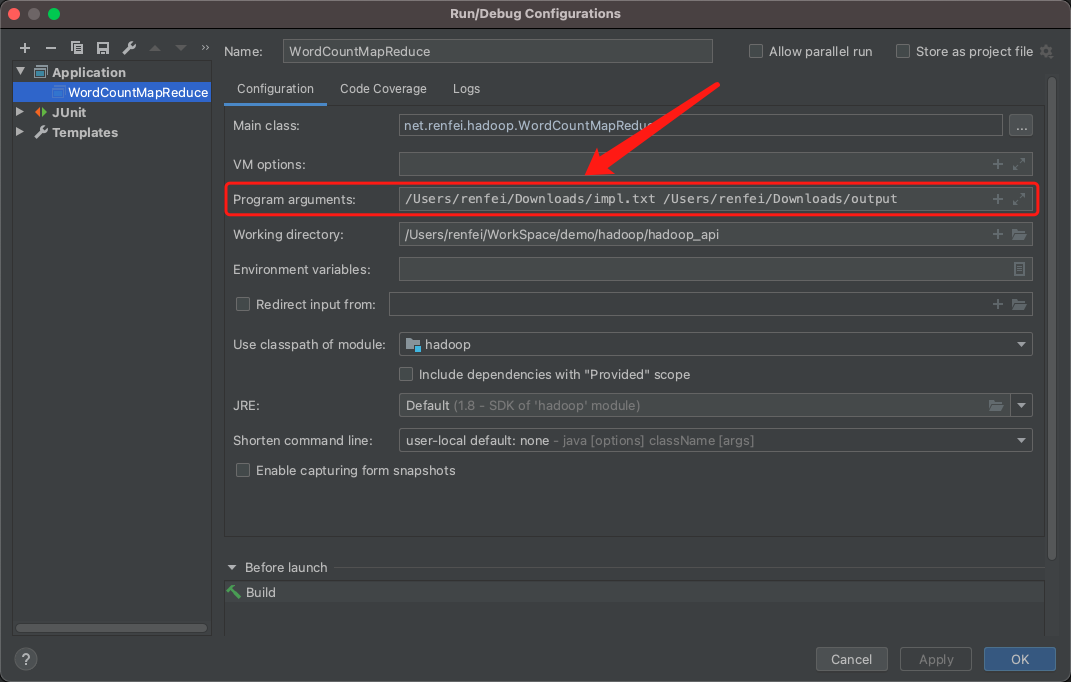
Running it directly will error out, because the array bounds on main’s arguments blow up when you don’t pass two arguments. You can set them like this:
Packaging and Running on the Cluster
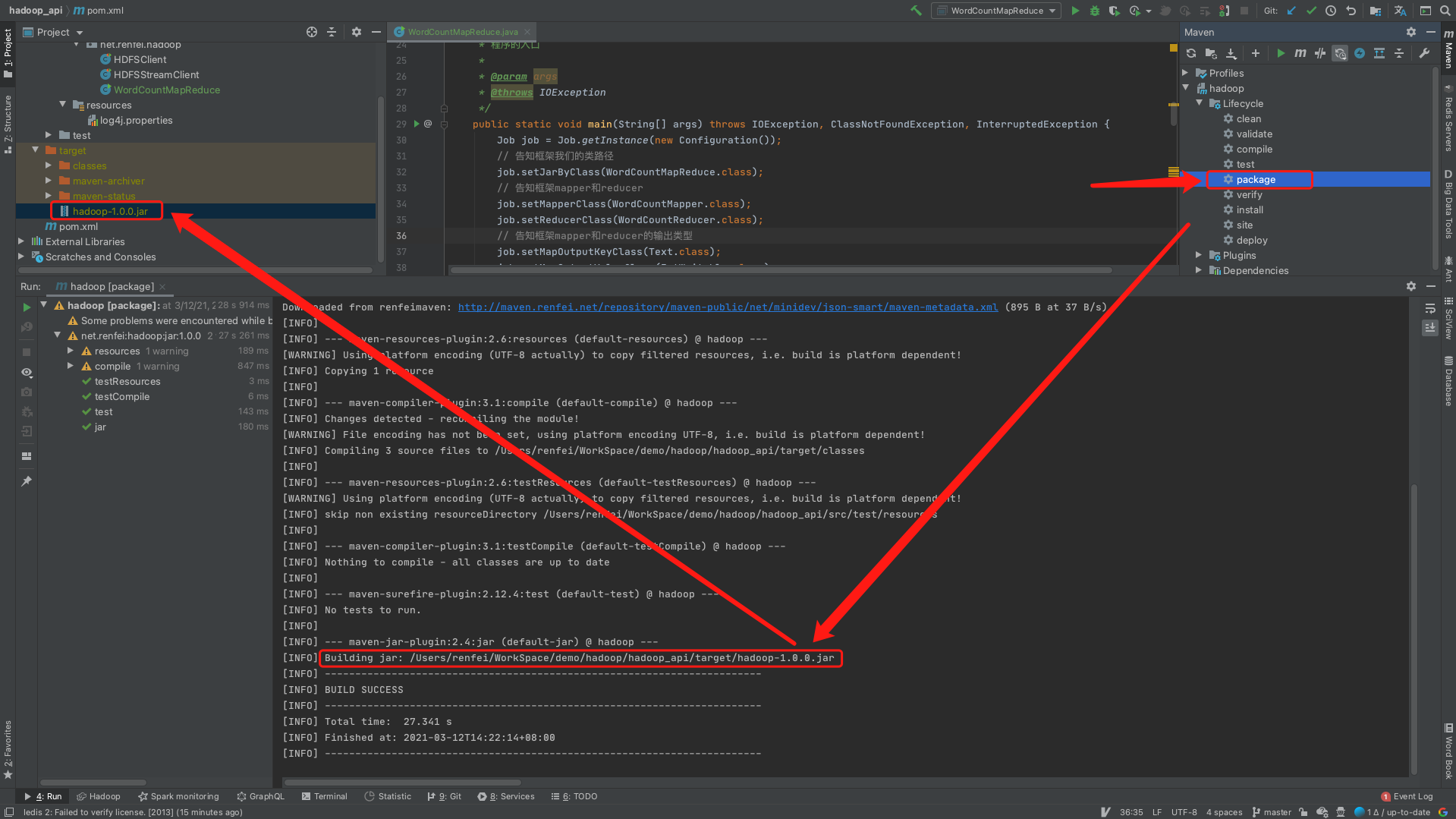
Run package with Maven and you’ll get a jar:
Upload it to the cluster and run:
hadoop jar hadoop-1.0.0.jar net.renfei.hadoop.WordCountMapReduce /demo/demo.txt /outdemoThe trailing arguments are the jar, the classpath, the input file, and the output folder.