
Many students often use the kill command to kill processes in daily Linux use. Some use kill directly, some use kill -9, some use kill -3. What do they mean and what’s the difference? Today we’ll learn about the kill command and signals in Linux.
The kill Command
The format of the kill command is kill -Signal pid, where pid is the process number and signal is the signal sent to the process. By default, kill sends the SIGTERM (15) signal to the process, telling it it needs to be shut down and should stop running and exit on its own.
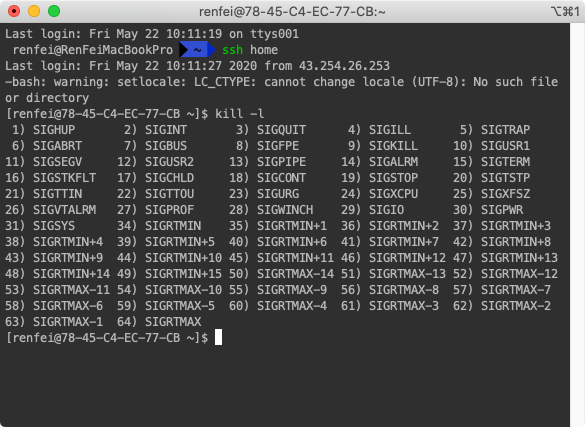
You can view the list of kill signals with the command kill -l:
Linux Signal
Linux supports POSIX standard signals and real-time signals. Below is a brief table of Linux signals:
| Signal | Value | Default Action | Meaning (reason for the signal) |
|---|---|---|---|
| SIGHUP | 1 | Term | Hangup of terminal or death of process |
| SIGINT | 2 | Term | Interrupt signal from keyboard |
| SIGQUIT | 3 | Core | Quit signal from keyboard |
| SIGILL | 4 | Core | Illegal instruction |
| SIGABRT | 6 | Core | Abort exception signal |
| SIGFPE | 8 | Core | Floating-point exception |
| SIGKILL | 9 | Term | Kill |
| SIGSEGV | 11 | Core | Segmentation violation (invalid memory reference) |
| SIGPIPE | 13 | Term | Broken pipe: write to a pipe with no reading process |
| SIGALRM | 14 | Term | Timer expired from alarm |
| SIGTERM | 15 | Term | Termination |
| SIGUSR1 | 30,10,16 | Term | User-defined signal 1 |
| SIGUSR2 | 31,12,17 | Term | User-defined signal 2 |
| SIGCHLD | 20,17,18 | Ign | Child stopped or terminated |
| SIGCONT | 19,18,25 | Cont | Continue if stopped |
| SIGSTOP | 17,19,23 | Stop | Stop signal not from terminal |
| SIGTSTP | 18,20,24 | Stop | Stop signal from terminal |
| SIGTTIN | 21,21,26 | Stop | Background process reads terminal |
| SIGTTOU | 22,22,27 | Stop | Background process writes terminal |
| SIGBUS | 10,7,10 | Core | Bus error (memory access error) |
| SIGPOLL | Term | Pollable event occurred (Sys V), synonymous with SIGIO | |
| SIGPROF | 27,27,29 | Term | Profiling timer expired |
| SIGSYS | 12,-,12 | Core | Invalid system call (SVr4) |
| SIGTRAP | 5 | Core | Trace/breakpoint trap |
| SIGURG | 16,23,21 | Ign | Socket urgent signal (4.2BSD) |
| SIGVTALRM | 26,26,28 | Term | Virtual timer expired (4.2BSD) |
| SIGXCPU | 24,24,30 | Core | CPU time limit exceeded (4.2BSD) |
| SIGXFSZ | 25,25,31 | Core | File size limit exceeded (4.2BSD) |
| SIGIOT | 6 | Core | IOT trap, synonymous with SIGABRT |
| SIGEMT | 7,-,7 | Term | |
| SIGSTKFLT | -,16,- | Term | Coprocessor stack error (unused) |
| SIGIO | 23,29,22 | Term | I/O now possible on descriptor |
| SIGCLD | -,-,18 | Ign | Synonymous with SIGCHLD |
| SIGPWR | 29,30,19 | Term | Power failure (System V) |
| SIGINFO | 29,-,- | Synonymous with SIGPWR | |
| SIGLOST | -,-,- | Term | File lock lost |
| SIGWINCH | 28,28,20 | Ign | Window size changed (4.3BSD, Sun) |
| SIGUNUSED | -,31,- | Term | Unused signal (will be SIGSYS) |
Some signal values are hardware-architecture dependent (generally alpha and sparc use the first value, i386, ppc, and sh use the middle value, mips uses the third value; - means the value is unknown for that architecture).
SIGKILL and SIGSTOP cannot be hooked, blocked, or ignored.
Before Linux 2.2 (inclusive), the default action of SIGSYS, SIGXCPU, SIGXFSZ, and SIGBUS (except on SPARC and MIPS) was to terminate the process but without a core dump. Linux 2.4 follows POSIX.1-2001, changing the default action of these signals to: terminate the process and also produce a core dump.
A process can change the default handling of a signal using the sigaction and signal system calls (using signal has poor portability). A process can choose one of the following three signal-handling methods:
- Perform the default action;
- Ignore the signal;
- Catch the signal, but call a custom handler via a signal handler.
A signal may be blocked. Each thread in a process has its own signal mask, indicating which signals of that thread are blocked. A thread sets its signal mask via pthread_sigmask. A single-threaded program can use sigprocmask to manipulate the signal mask. In a multi-threaded program, all threads share the same default behavior for handling a given signal.
The Difference Between kill, kill -9, and kill -3
After the above study, you now know the difference.
kill sends signal 15 by default, which is SIGTERM — telling the process it needs to be shut down and should stop running and exit on its own. The process can clean up caches and exit on its own, or refuse to exit.
kill -9 sends SIGKILL, meaning the process is terminated and must exit immediately — forcibly killing the process. This signal cannot be caught or ignored.
kill -3 prints the stack info of each thread of the process. After kill -3 pid, the file is saved at /proc/${pid}/cwd, with the filename antBuilderOutput.log.
Summary
If you want the process to run its own exit/cleanup routine, use the kill command, so the process can perform some cleanup and then exit. If the process is frozen and you need to record the scene of the accident, use kill -3 to record the accident-scene info and then exit. If you don’t need anything and just want to kill a process, use kill -9 — kill it violently.