
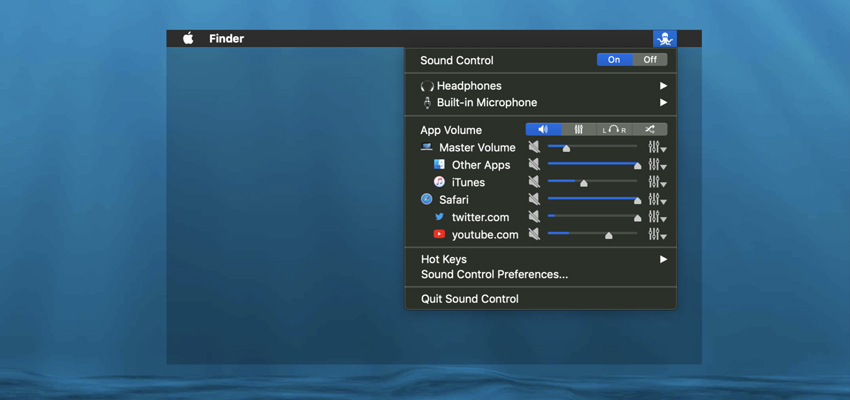
Sound Control lets users use a software volume mixer. Sound Control lets users easily and quickly change app volume and selectively apply a system-wide EQ to app audio. Sound Control does this by adding a software mixer to the Mac’s menu bar. Besides the volume mixer, Sound Control adds a software equalizer to your audio output, letting users easily tune the Mac’s audio to a specific taste, or appropriately adjust the speaker’s frequency response.
Features
- Per-app volume control, including mute
- System-wide equalizer with 10 or 31 bands
- Easy control via menu bar item or hotkey
- Add software and keyboard control to HDMI and other audio devices
- Independently route each app’s audio to different output devices
Info
Compatibility: OS X 10.10 or later
Language: English
Website: https://staticz.com/soundcontrol/
What’s New in Sound Control 2.4.2
- Reduced CPU usage.
- Fixed the alignment of the device menu when the plugin isn’t installed.
- Now truncates longer app and device names.
- Fixed a memory leak in the app.
- Now remembers the previous volume when mute is disabled on an app.
- New welcome.
- Better explanation of other components.
- The microphone input agent no longer tries to launch at login when Sound Siphon isn’t also installed.
- The “Install Other Components” item in Preferences → Support tab is now hidden if the component is already installed.
- EQ presets can now be saved to update them.
- Fixed a crash that could occur when connecting or disconnecting an audio device.
- Fixed an issue that disabled the touch-bar preferences.
- The back button now works correctly in the touch bar.
- The main volume in the touch bar now updates correctly when volume is changed elsewhere.