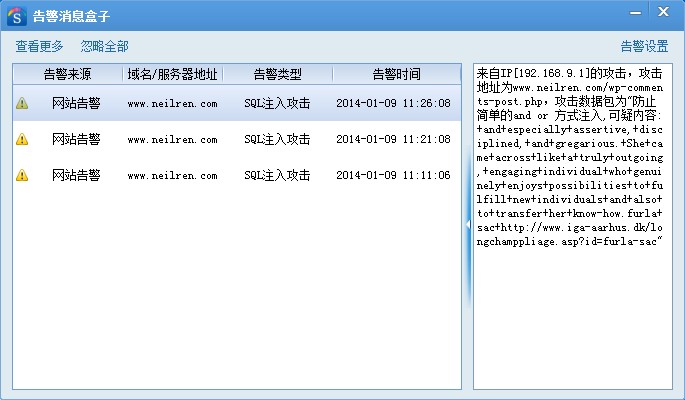
Once a blog is indexed by search engines, WordPress spam comments follow — a very common problem. Akismet can block most of them, but it has a certain false-positive rate, and you still have to dig through the trash now and then, which is annoying. Some friends use CAPTCHA, but non-official plugins always carry a risk of instability, and machines now recognize CAPTCHAs better and better, so they can hardly be stopped. After moving the blog from a virtual host to a VPS, monitoring the site became more thorough and convenient, and I also found a problem: POST requests to wp-comments-post.php kept getting blocked by the site’s safety dog, and the submitted content was spam comments. It turned out they never used the button at all — they POST data straight to wp-comments-post.php. So how do we defend against that? Changing the names of the submitted parameters filters out most spam (not strictly — if the auto-comment software analyzes the page to get the input name attributes, it fails; but I don’t think they’re that smart). The modification is as follows:
- Modify the HTML form (find comments.php in your theme directory, open and edit it). For example, I prefixed each input’s name attribute with “hz-hc-” and changed the id attributes — you can change them however you like.
<input type="text" name="hz-hc-arg0" id="arg0" .../> <input type="text" name="hz-hc-arg1" id="arg1" .../> <input type="text" name="hz-hc-arg2" id="arg2" .../> <textarea name="hz-hc-arg3" id="arg3" .../>- Modify the backend (find wp-comments-post.php in the WordPress root, open and edit it). In
$_POST["XXX"], “XXX” is the input name you defined in the HTML form above.
$comment_author = (isset($_POST["hz-hc-arg0"])) ? trim(strip_tags($_POST["hz-hc-arg0"])) : null; $comment_author_email = (isset($_POST["hz-hc-arg1"])) ? trim($_POST["hz-hc-arg1"]) : null; $comment_author_url = (isset($_POST["hz-hc-arg3"])) ? trim($_POST["hz-hc-arg2"]) : null; $comment_content = (isset($_POST["hz-hc-arg3"])) ? trim($_POST["hz-hc-arg3"]) : null;After modifying, you also need to change the theme’s JS file. For the Mystique theme I use, that’s jquery.mystique.js — find target_id="#comment" and change it to the input id you defined above, target_id="#arg3". That’s it, no plugin needed.
-------------------------------------
Another method is to rename this file so the bots can’t find the submission entry. I prefer this one. Rename wp-comments-post.php in the blog root to anything, e.g. no-comments-post.php. Open comments.php in the theme and find “wp-comments-post.php” in the code, change it to no-comments-post.php — the new name just has to match the one you renamed to. I suggest making it less regular, in case spam-comment mechanisms upgrade and guess similar addresses via regex.