
Now that Google Chrome has been pushing HTTPS hard, almost every website is served over HTTPS. Have you heard of HSTS (HTTP Strict Transport Security)? It makes your website more secure and faster to load.
Prerequisite
Your website must support HTTPS, and all subdomains must support HTTPS too. If any subdomain doesn’t, stop here — this post isn’t for you.
HSTS
HSTS (HTTP Strict Transport Security) is an internet security policy mechanism published by the IETF. A website can opt into HSTS to force browsers to communicate only over HTTPS, reducing session hijacking risk.
With HSTS enabled, the browser abandons plaintext HTTP requests and forces HTTPS, so ISPs and man-in-the-middle attackers can’t hijack your site.
To enable HSTS, add a Strict-Transport-Security header to your HTTPS responses. Three forms:
- Strict-Transport-Security: max-age=31536000
- Strict-Transport-Security: max-age=31536000; includeSubDomains
- Strict-Transport-Security: max-age=31536000; includeSubDomains; preload
max-age is how long the HSTS policy lives — 31536000 tells the browser to force HTTPS for the next 31536000 seconds (one year). includeSubDomains extends the policy to all subdomains. preload signals that the site may be included in the preload list — which is the point of this post.
For more on HSTS, see RFC 6797.
The preload list
I mentioned preload above, and I promised faster loading — both thanks to the HSTS preload list.
Many browsers, Chrome included, are built on the Chromium open source project, and Chromium maintains a list — right in its source code. You can look it up in the Chromium source: https://source.chromium.org/chromium/chromium/src/+/main:net/http/transport_security_state_static.json?q=renfei.net&ss=chromium
Once your domain is in the HSTS preload list — hard-coded into Chromium itself — the browser forces HTTPS on every visit, whether or not the user has ever been to your site.
That’s also where the speed comes from: the HTTP→HTTPS redirect step disappears entirely. The browser goes straight to HTTPS without ever talking to your site first.
To check whether a domain is built into the browser, open Chrome’s settings page: chrome://net-internals/#hsts and query under “Query HSTS/PKP domain”.
Why join the preload list?
First, my site is fully HTTPS, so dropping the redirect step makes it faster.
Second, it eliminates session hijacking. Neither ISPs nor man-in-the-middle attackers can hijack HTTPS content anymore — but they can still hijack at that first HTTP→HTTPS redirect step. With your domain preloaded, the browser never even attempts HTTP.
Defending against NTP attacks
HSTS is a strong mechanism for forcing HTTPS. The only practical way to undermine it is an attack on the Network Time Protocol (NTP) — manipulating system time via a spoofed NTP server so the attacker can trick the browser into expiring HSTS entries and allowing insecure HTTP connections. Being on the preload list effectively defends against this.
How to join the HSTS preload list
- Your root domain must redirect from HTTP to HTTPS.
- When serving the root domain over HTTPS, send the header: Strict-Transport-Security: max-age=31536000; includeSubDomains; preload
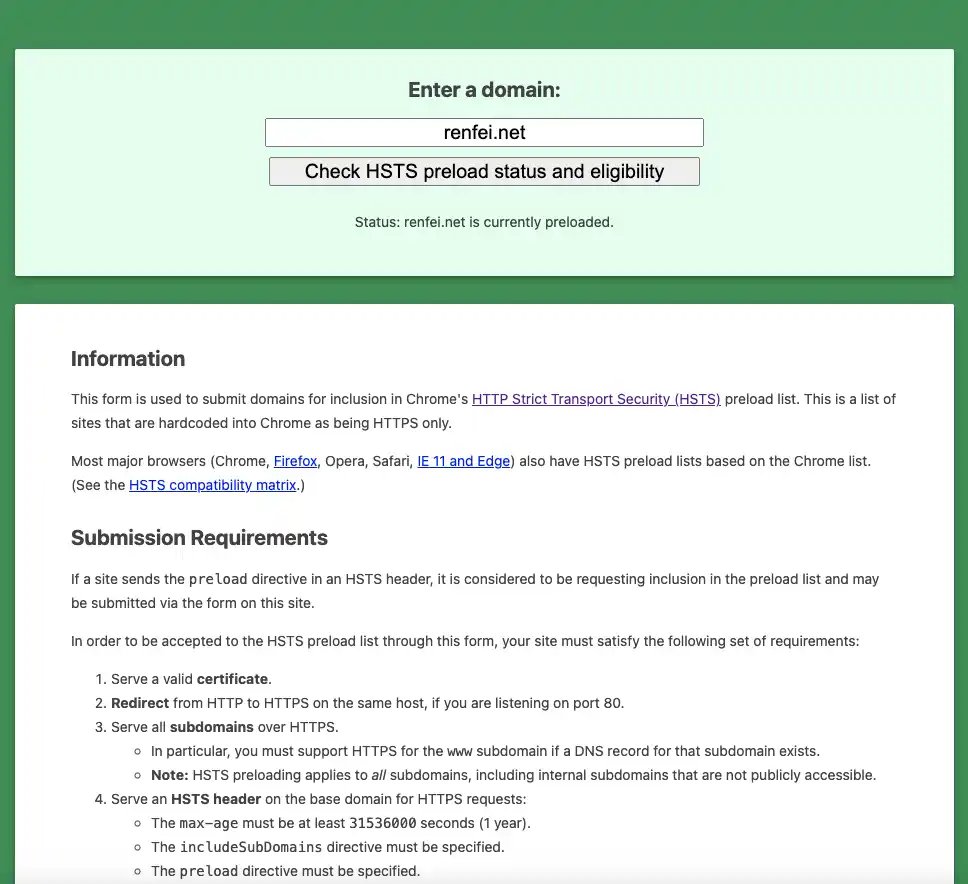
- Note: max-age must be at least 31536000 seconds (1 year); includeSubDomains is required; preload is required.
- With the header set, go to https://hstspreload.org and check your domain. If everything passes you’ll see the Submit form — submit the application.
- Wait for Chromium’s next update, and your domain ships with the source code into the preload list.
The danger
Once you’re on the list, the browser will force HTTPS for your domain and all subdomains, forever. You must make sure every subdomain supports HTTPS, or those pages simply won’t open!
You can request removal from the preload list, but due to caching, a full removal can take a year or more.