
Addendum Another article supplements this one; please see “Key-Exchange Logic for Encrypting Interface Data in Front-End/Back-End Separated Projects (Addendum: MITM Man-in-the-Middle Attack)”
In front-end/back-end separated projects, sensitive info such as passwords and amounts often needs to be transmitted. Signature/verification algorithms only guarantee data isn’t tampered with, but can’t keep data confidential. If the user’s password is transmitted in plaintext, it can be intercepted by nodes in the network. Although most network operators don’t intercept transmitted content, you can’t rule out whether the WiFi the user connects to is a phishing network, so sensitive info needs encryption when transmitted. This article discusses how to securely let the client and server exchange keys.
Choosing the Encryption Algorithm: RSA or AES
Encryption/decryption involves choosing an algorithm. The more common ones are the asymmetric RSA and the symmetric AES. What are their characteristics and how to choose? Let’s go through them.
RSA Asymmetric Encryption
RSA generates two keys, a public key and a private key. Data encrypted with the public key must be decrypted with the private key — the benefit is only the server has the private key, so others can’t decrypt. But it has a fatal weakness: the encrypted content’s length can’t exceed the key length. Taking RSA 1024 as an example, PKCS#1’s recommended padding takes 11 bytes, so 128 bytes (1024 bits) minus 11 bytes is 117 bytes — that is, with RSA 1024 we can encrypt at most 117 bytes of content; exceeding this errors out, yet often the content we transmit is huge, and we can’t increase the key length without limit. And on mobile devices performance is limited, not suitable for heavy encrypt/decrypt. So we also need AES.
AES Symmetric Encryption
Because RSA above is limited by key length, we also need AES. AES’s advantage is it can encrypt/decrypt any length of plaintext. But its disadvantage is it doesn’t distinguish private and public keys — there’s only one key, and anyone who knows it can encrypt/decrypt.
RSA and AES Combined, Complementing Each Other
RSA and AES each have pros and cons. If we combine them we can complement each other: use RSA to protect AES’s key, so only the two parties know the AES key, and AES can encrypt any length of info. This solves their respective weaknesses.
Key-Exchange Logic
-
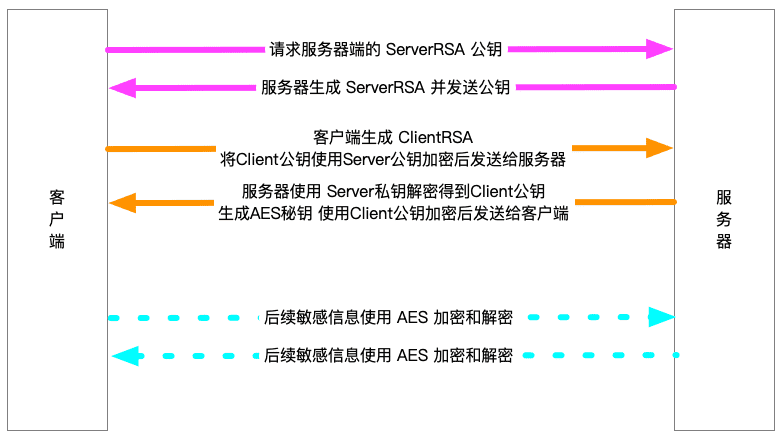
The client requests the RSA public key from the server; the server generates an RSA key pair and sends the public key to the client. We name it “Server public key”.
-
The client receives the “Server public key”, generates its own RSA key pair, which we name “Client public key”, and uses the “Server public key” to encrypt its “Client public key”, sending it to the server.
-
The server receives the client’s request, uses the “Server private key” to decrypt and obtain the “Client public key”.
-
The server generates an “AES key”, uses the “Client public key” to encrypt the “AES key” and sends it to the client.
-
The client uses the “Client private key” to decrypt and obtain the “AES key”.
Subsequent interactions between the two parties use the “AES key” for encryption/decryption; the key-exchange flow is complete.
Example code:
@Test
public void reaTest() {
    // server side
    Map<Integer, String> serverKeyMap = RSAUtils.genKeyPair(2048);
    // client side
    Map<Integer, String> clientKeyMap = RSAUtils.genKeyPair(1024);
    String clientPubKey = clientKeyMap.get(0);
    try {
        // client uses server public key to encrypt its own public key
        String encrypt = RSAUtils.encrypt(clientPubKey, serverKeyMap.get(0));
        // server uses its own private key to decrypt and get the client public key
        Assert.assertEquals(clientPubKey, RSAUtils.decrypt(encrypt, serverKeyMap.get(1)));
        String AESkey = "aeskey123456";
        // use client public key to encrypt the AES key
        String encryptAES = RSAUtils.encrypt(AESkey, clientPubKey);
        // client uses its own private key to decrypt and get the AES key
        Assert.assertEquals(AESkey, RSAUtils.decrypt(encryptAES, clientKeyMap.get(1)));
    } catch (Exception ex) {
        ex.printStackTrace();
        Assert.assertNull(ex);
    }
}