

 Windows 8.1 has been out for a while. The IE11 that comes with Windows 8.1 doesn’t seem very usable. Why? Alipay, online banking, or big sites recognize it as Firefox. This compatibility issue must have troubled many friends. Let’s effectively solve this, so sites know we’re using IE, not Firefox.
First, why do sites think we’re Firefox? IE 11 changed the UA string; the new string is: Mozilla/5.0 (Windows NT 6.3; WOW64; Trident/7.0; rv:11.0) like Gecko. Because it has no “MSIE” string, but has a “Gecko” string, many sites think IE 11 is Firefox! So the awkward situation: using IE but prompted to use IE.
So how to solve it effectively? Modify the UA string to tell sites we’re IE.
- Win + R, type gpedit.msc to open the Group Policy Editor;
- Navigate to Computer Configuration → Administrative Templates → Internet Explorer → Custom User Agent String;
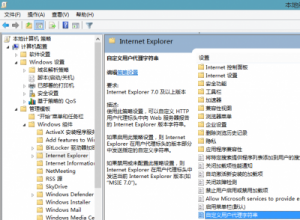
- Double-click to open, set to Enabled, enter the string “MSIE 8.0”;
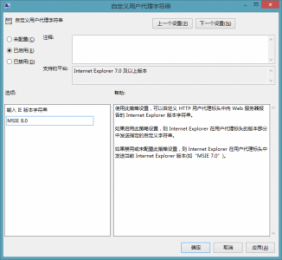


That’s it, simple, right? Now sites can recognize us as IE by the UA string. Set it once and it works forever.
I also want to try Visual Studio 2013; you go try it too!